0%

GitHub仓库

Mininet

1. Mininet 基本使用

Mininet指令

net

查看拓扑链接情况

xterm

xterm [hosts]
打开对应主机终端

pingall

测试所有设备联通性

在对应主机执行指令

[host] {command}

iperf指令

1
2
3
4
5
6
7
iperf 
-c [ip] 客户端IP 与-s互斥
-s 服务器 与-c互斥
-t [seconds] 测量时间
-i [seconds] 测量报告次数
-p [port] 端口
-u 使用UDP

2. 链路性能参数设置及iperf数据绘图

链路性能设置

mn --link=tc,loss=[loss_rate],bw=[band_width],delay='[delay]'

loss -> 每条链路的丢包率
bw -> 链路带宽
delay -> 每条链路的延迟

iperf结果绘图

在服务器端使用 iperf -s -i 1 | tee tcp.txt
将结果通过管道存放到文件

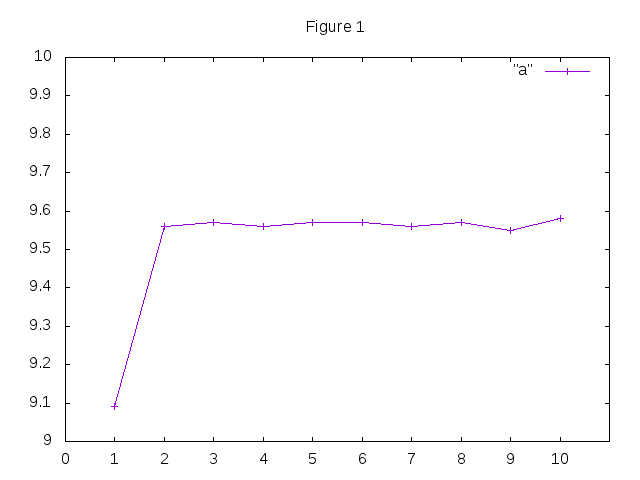
效果如下

1
2
3
4
5
6
7
8
9
10
11
12
13
14
15
16
17
18
19
20
------------------------------------------------------------
Server listening on TCP port 5001
TCP window size: 85.3 KByte (default)
------------------------------------------------------------
[ 14] local 10.0.0.2 port 5001 connected with 10.0.0.1 port 60150
[ ID] Interval Transfer Bandwidth
[ 14] 0.0- 1.0 sec 1.08 MBytes 9.09 Mbits/sec
[ 14] 1.0- 2.0 sec 1.14 MBytes 9.56 Mbits/sec
[ 14] 2.0- 3.0 sec 1.14 MBytes 9.57 Mbits/sec
[ 14] 3.0- 4.0 sec 1.14 MBytes 9.56 Mbits/sec
[ 14] 4.0- 5.0 sec 1.14 MBytes 9.57 Mbits/sec
[ 14] 5.0- 6.0 sec 1.14 MBytes 9.57 Mbits/sec
[ 14] 6.0- 7.0 sec 1.14 MBytes 9.56 Mbits/sec
[ 14] 7.0- 8.0 sec 1.14 MBytes 9.57 Mbits/sec
[ 14] 8.0- 9.0 sec 1.14 MBytes 9.55 Mbits/sec
[ 14] 9.0-10.0 sec 1.14 MBytes 9.58 Mbits/sec
[ 14] 10.0-11.0 sec 1.14 MBytes 9.57 Mbits/sec
[ 14] 11.0-12.0 sec 1.14 MBytes 9.55 Mbits/sec
[ 14] 12.0-13.0 sec 1.14 MBytes 9.58 Mbits/sec
[ 14] 0.0-13.1 sec 14.9 MBytes 9.53 Mbits/sec

然后 使用

1
cat tcp.txt | grep sec | head -n 10 | tr "-" " " | awk '{print $4,$8} > a'

其中

  • cat tcp.txt读取文件并显示
  • grep sec 会标记出含有sec的列
  • head -n 10 取出前十行
  • tr "-" " " 会将-替换为空格
  • awk '{print $4,$8}' 会取出第四列和第八列

效果如下

1
2
3
4
5
6
7
8
9
10
1.0 9.09
2.0 9.56
3.0 9.57
4.0 9.56
5.0 9.57
6.0 9.57
7.0 9.56
8.0 9.57
9.0 9.55
10.0 9.58

然后我们使用gnuplot绘图

  • 输入gnuplot 回车 进入gnuplot
  • 输入plot "a" title "tcp" with linespoints 绘图,"a" 为文件名,title "tcp"设置标题,with linespoints设置为带点直线
  • set xrange[0:10]set yrange[0:10]设置x、y轴范围 0 ~ 10
  • set xtics 0,1,10set ytics 0,1,10设置x、y轴刻度 0开始 10结束 1步进
  • set xlabel "time(sec)"set ylabel "Throughput(Mbps)"设置x、y轴标记文字
  • set title "Tcp" 设置图标标题为Tcp
  • set terminal gif 设置保存格式为gif
  • set output "a.gif" 设置保存的文件名为a.gif
  • replot 修改设置后重绘或者可以保存文件

3. 使用Mininet脚本创建简单网络拓扑

1. 最简单的路由结构

h1 —— h2

1.py
1
2
3
4
5
6
7
8
9
10
11
12
13
14
15
16
17
18
#!/usr/bin/env python
from mininet.cli import CLI
from mininet.net import Mininet
from mininet.link import Link,TCLink

if '__main__' == __name__:
net = Mininet(link=TCLink) # 创建一个Mininet对象 连接方式为TCLink
# 添加两个host
h1 = net.addHost('h1')
h2 = net.addHost('h2')
# 链接两个host
Link(h1,h2)
# 对网络执行构建操作
net.build()
# 启动CLI(CommandLine Interface)
CLI(net)
# 释放网络结构
net.stop()

2. 含一个路由的结构

h1 —— r —— h2

2.py
1
2
3
4
5
6
7
8
9
10
11
12
13
14
15
16
17
#!/usr/bin/env python
from mininet.cli import CLI
from mininet.net import Mininet
from mininet.link import Link,TCLink

if '__main__' == __name__:
net = Mininet(link=TCLink)
h1 = net.addHost('h1')
h2 = net.addHost('h2')
# 这是作为路由器的设备
r = net.addHost('r')
# 建立到路由的链接
Link(h1,r)
Link(h2,r)
net.build()
CLI(net)
net.stop()

此时网络拓扑结构如下
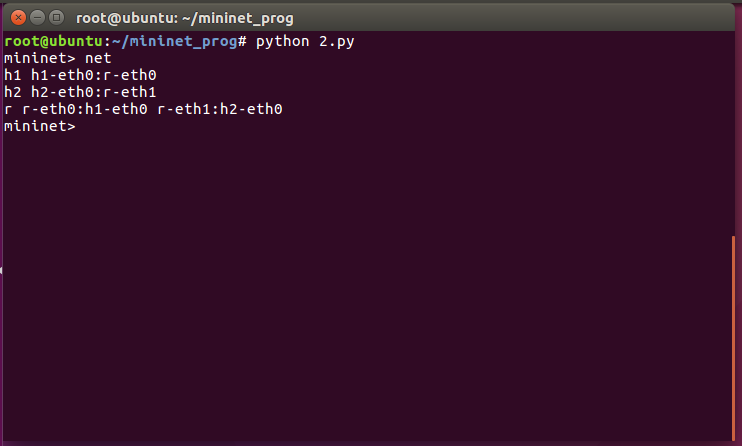
此时h1和h2是不连通的 需要配置路由使其联通
规划如下:

  • h1 使用 192.168.1.1/24
  • h2 使用 192.168.2.1/24
  • h1 使用 192.168.1.254 与 r 连接
  • h2 使用 192.168.2.254 与 r 连接
    步骤如下:
  • h1 使用 ifconfig h1-eth0 0 清空分配的地址
  • h1 使用 ifconfig h1-eth0 192.168.1.1/24 分配地址
  • h2 使用 ifconfig h2-eth0 0 清空分配的地址
  • h2 使用 ifconfig h2-eth0 192.168.2.1/24 分配地址
  • h1 使用 ip route add default via 192.168.1.254 设定默认路由
  • h2 使用 ip route add default via 192.168.2.254 设定默认路由
  • r 使用 ifconfig r-eth0 0 清空分配的地址
  • r 使用 ifconfig r-eth0 192.168.1.254/24 分配地址
  • r 使用 ifconfig r-eth1 0 清空分配的地址
  • r 使用 ifconfig r-eth1 192.168.2.254/24 分配地址
    此时两台host已经互通

3. 使用脚本自动建立路由

1
2
3
4
5
6
7
8
9
10
11
12
13
14
15
16
17
18
19
20
21
22
23
24
25
26
27
28
29
30
31
32
#!/usr/bin/env python
from mininet.cli import CLI
from mininet.net import Mininet
from mininet.link import Link,TCLink

if '__main__' == __name__:
net = Mininet(link=TCLink)
h1 = net.addHost('h1')
h2 = net.addHost('h2')

r = net.addHost('r')

Link(h1,r)
Link(h2,r)
net.build()

# build route
h1.cmd("ifconfig h1-eth0 0")
h1.cmd("ifconfig h1-eth0 192.168.1.1/24")
h1.cmd("ip route add default via 192.168.1.254")
h2.cmd("ifconfig h2-eth0 0")
h2.cmd("ifconfig h2-eth0 192.168.2.1/24")
h2.cmd("ip route add default via 192.168.2.254")
r.cmd("ifconfig r-eth0 0")
r.cmd("ifconfig r-eth0 192.168.1.254/24")
r.cmd("ifconfig r-eth1 0")
r.cmd("ifconfig r-eth1 192.168.2.254/24")
r.cmd("echo 1 > /proc/sys/net/ipv4/ip_forward")

CLI(net)
net.stop()


4. 使用Mininet脚本创建复杂网络拓扑

1. 两个路由器

1
2
3
4
5
6
7
8
9
10
11
12
13
14
15
16
17
18
19
20
21
22
23
24
25
26
27
28
29
30
31
32
33
34
35
36
37
38
#!/usr/bin/env python
from mininet.cli import CLI
from mininet.net import Mininet
from mininet.link import Link, TCLink

if '__main__' == __name__:
net = Mininet(link=TCLink)
h1 = net.addHost('h1')
h2 = net.addHost('h2')
r1 = net.addHost('r1')
r2 = net.addHost('r2')

Link(h1,r1)
Link(h2,r2)
Link(r1,r2)
net.build()

# build route
h1.cmd("ifconfig h1-eth0 0")
h1.cmd("ifconfig h1-eth0 192.168.1.1/24")
h1.cmd("ip route add default via 192.168.1.254")
h2.cmd("ifconfig h2-eth0 0")
h2.cmd("ifconfig h2-eth0 192.168.2.1/24")
h2.cmd("ip route add default via 192.168.2.254")
r1.cmd("ifconfig r1-eth0 0")
r1.cmd("ifconfig r1-eth0 192.168.1.254/24")
r1.cmd("ifconfig r1-eth1 0")
r1.cmd("ifconfig r1-eth1 10.0.0.1/24")
r1.cmd("echo 1 > /proc/sys/net/ipv4/ip_forward")
r1.cmd("ip route add 192.168.2.0/24 via 10.0.0.2")
r2.cmd("ifconfig r2-eth0 0")
r2.cmd("ifconfig r2-eth0 192.168.2.254/24")
r2.cmd("ifconfig r2-eth1 0")
r2.cmd("ifconfig r2-eth1 10.0.0.2/24")
r2.cmd("echo 1 > /proc/sys/net/ipv4/ip_forward")
r2.cmd("ip route add 192.168.1.0/24 via 10.0.0.1")
CLI(net)
net.stop()

拓扑结构如下:
h1 h1-eth0:r1-eth0
h2 h2-eth0:r2-eth0
r1 r1-eth0:h1-eth0 r1-eth1:r2-eth1
r2 r2-eth0:h2-eth0 r2-eth1:r1-eth1

2.NAT地址转换

1
2
3
4
5
6
7
8
9
10
11
12
13
14
15
16
17
18
19
20
21
22
23
24
25
26
27
28
29
30
31
32
33
34
35
36
37
38
#!/usr/bin/env python
from mininet.cli import CLI
from mininet.net import Mininet
from mininet.link import Link, TCLink

if '__main__' == __name__:
net = Mininet(link=TCLink)
h1 = net.addHost('h1')
h2 = net.addHost('h2')
r1 = net.addHost('r1')
r2 = net.addHost('r2')

Link(h1,r1)
Link(h2,r2)
Link(r1,r2)
net.build()

# build route
h1.cmd("ifconfig h1-eth0 0")
h1.cmd("ifconfig h1-eth0 192.168.1.1/24")
h1.cmd("ip route add default via 192.168.1.254")
h2.cmd("ifconfig h2-eth0 0")
h2.cmd("ifconfig h2-eth0 22.1.1.1/24")
h2.cmd("ip route add default via 22.1.1.254")
r1.cmd("ifconfig r1-eth0 0")
r1.cmd("ifconfig r1-eth1 0")
r1.cmd("ifconfig r1-eth0 192.168.1.254/24")
r1.cmd("ifconfig r1-eth1 12.1.1.1/24")
r1.cmd("ip route add default via 12.1.1.2")
r1.cmd("echo 1 > /proc/sys/net/ipv4/ip_forward")
r1.cmd("iptables -t nat -A POSTROUTING -o r1-eth1 -s 192.168.1.0/24 -j MASQUERADE")
r2.cmd("ifconfig r2-eth0 0")
r2.cmd("ifconfig r2-eth0 22.1.1.254/24")
r2.cmd("ifconfig r2-eth1 0")
r2.cmd("ifconfig r2-eth1 12.1.1.2/24")
r2.cmd("echo 1 > /proc/sys/net/ipv4/ip_forward")
CLI(net)
net.stop()

其中 iptables -t nat -A POSTROUTING -o r1-eth1 -s 192.168.1.0/24 -j MASQUERADE 起到了启动NAT的作用
-t指定了表名为NAT
-A指定了在POSTROUTING末尾插入规则
-o匹配流出网卡为r1-eth1
-s匹配源地址为192.168.1.0/24网段
-j使用MASQUERADE选项进行地址伪装 可以自动匹配当前流出网卡的ip地址无需手动指定


5. Mininet中如何创建bridge

1.简单的桥接

1
2
3
4
5
6
br1: mybr
|
|
+--+--+
| |
h1 h2
1
2
3
4
5
6
7
8
9
10
11
12
13
14
15
16
17
18
19
20
21
22
23
24
25
26
27
28
29
30
31
32
33
34
35
36
37
38
39
40
41
42
#!/usr/bin/env python
from mininet.cli import CLI
from mininet.net import Mininet
from mininet.link import Link,TCLink

if '__main__' == __name__:
net = Mininet(link=TCLink) # Get a mininet object with TCLink
# add hosts to net object
h1 = net.addHost('h1')
h2 = net.addHost('h2')
h3 = net.addHost('h3')
br1 = net.addHost('br1')
# create link between to hosts
net.addLink(h1,br1)
net.addLink(h2,br1)
net.addLink(h3,br1)
# build net structure
net.build()
# clear ip addr
h1.cmd("ifconfig h1-eth0 0")
h2.cmd("ifconfig h2-eth0 0")
h3.cmd("ifconfig h3-eth0 0")
br1.cmd("ifconfig br1-eth0 0")
br1.cmd("ifconfig br1-eth1 0")
br1.cmd("ifconfig br1-eth2 0")
# add bridge
br1.cmd("brctl addbr mybr")
# add interface to bridge
br1.cmd("brctl addif mybr br1-eth0")
br1.cmd("brctl addif mybr br1-eth1")
br1.cmd("brctl addif mybr br1-eth2")
# set bridge up
br1.cmd("ifconfig mybr up")
# set ip address
h1.cmd("ifconfig h1-eth0 192.168.10.1/24")
h2.cmd("ifconfig h2-eth0 192.168.10.2/24")
h3.cmd("ifconfig h3-eth0 192.168.10.3/24")

# start CommandLine Interface
CLI(net)
# release net structure
net.stop()

2.两个网桥

1
2
3
4
5
6
7
8
br1: 
+-----------------------+
| mybr1 mybr2 |
+---|--------------|----+
| |
+--+--+ +--+--+
| | | |
h1 h2 h3 h4
1
2
3
4
5
6
7
8
9
10
11
12
13
14
15
16
17
18
19
20
21
22
23
24
25
26
27
28
29
30
31
32
33
34
35
36
37
38
39
40
41
42
43
44
45
46
47
48
49
50
51
52
#!/usr/bin/env python
from mininet.cli import CLI
from mininet.net import Mininet
from mininet.link import Link,TCLink

if '__main__' == __name__:
net = Mininet(link=TCLink) # Get a mininet object with TCLink
# add hosts to net object
h1 = net.addHost('h1')
h2 = net.addHost('h2')
h3 = net.addHost('h3')
h4 = net.addHost('h4')
br1 = net.addHost('br1')
# create link between to hosts
net.addLink(h1,br1)
net.addLink(h2,br1)
net.addLink(h3,br1)
net.addLink(h4,br1)
# build net structure
net.build()
# clear ip addr
h1.cmd("ifconfig h1-eth0 0")
h2.cmd("ifconfig h2-eth0 0")
h3.cmd("ifconfig h3-eth0 0")
h4.cmd("ifconfig h4-eth0 0")
br1.cmd("ifconfig br1-eth0 0")
br1.cmd("ifconfig br1-eth1 0")
br1.cmd("ifconfig br1-eth2 0")
br1.cmd("ifconfig br1-eth3 0")
# add bridge
br1.cmd("brctl addbr mybr1")
br1.cmd("brctl addbr mybr2")
# add interface to bridge
br1.cmd("brctl addif mybr1 br1-eth0")
br1.cmd("brctl addif mybr1 br1-eth1")
br1.cmd("brctl addif mybr2 br1-eth2")
br1.cmd("brctl addif mybr2 br1-eth3")
# set bridge up
br1.cmd("ifconfig mybr1 up")
br1.cmd("ifconfig mybr2 up")
# set ip address
h1.cmd("ifconfig h1-eth0 192.168.10.1/24")
h2.cmd("ifconfig h2-eth0 192.168.10.2/24")
h3.cmd("ifconfig h3-eth0 192.168.20.1/24")
h4.cmd("ifconfig h4-eth0 192.168.20.2/24")


# start CommandLine Interface
CLI(net)
# release net structure
net.stop()

3. 两网桥间互通

通过添加路由器r1 让流量穿过r1 使两网桥互通

1
2
3
4
5
6
7
8
9
10
11
12
              r1
|
|
+-------+------+
br1: | |
+---|--------------|----+
| mybr1 mybr2 |
+---|--------------|----+
| |
+--+--+ +--+--+
| | | |
h1 h2 h3 h4

1
2
3
4
5
6
7
8
9
10
11
12
13
14
15
16
17
18
19
20
21
22
23
24
25
26
27
28
29
30
31
32
33
34
35
36
37
38
39
40
41
42
43
44
45
46
47
48
49
50
51
52
53
54
55
56
57
58
59
60
61
62
63
64
65
66
67
#!/usr/bin/env python
from mininet.cli import CLI
from mininet.net import Mininet
from mininet.link import Link,TCLink

if '__main__' == __name__:
net = Mininet(link=TCLink) # Get a mininet object with TCLink
# add hosts to net object
h1 = net.addHost('h1')
h2 = net.addHost('h2')
h3 = net.addHost('h3')
h4 = net.addHost('h4')
br1 = net.addHost('br1')
r1 = net.addHost('r1')
# create link between to hosts
net.addLink(h1,br1)
net.addLink(h2,br1)
net.addLink(h3,br1)
net.addLink(h4,br1)
net.addLink(br1,r1)
net.addLink(br1,r1)
# build net structure
net.build()
# clear ip addr
h1.cmd("ifconfig h1-eth0 0")
h2.cmd("ifconfig h2-eth0 0")
h3.cmd("ifconfig h3-eth0 0")
h4.cmd("ifconfig h4-eth0 0")
br1.cmd("ifconfig br1-eth0 0")
br1.cmd("ifconfig br1-eth1 0")
br1.cmd("ifconfig br1-eth2 0")
br1.cmd("ifconfig br1-eth3 0")
br1.cmd("ifconfig br1-eth4 0")
br1.cmd("ifconfig br1-eth5 0")
# add bridge
br1.cmd("brctl addbr mybr1")
br1.cmd("brctl addbr mybr2")
# add interface to bridge
br1.cmd("brctl addif mybr1 br1-eth0")
br1.cmd("brctl addif mybr1 br1-eth1")
br1.cmd("brctl addif mybr1 br1-eth4")
br1.cmd("brctl addif mybr2 br1-eth2")
br1.cmd("brctl addif mybr2 br1-eth3")
br1.cmd("brctl addif mybr2 br1-eth5")
# set bridge up
br1.cmd("ifconfig mybr1 up")
br1.cmd("ifconfig mybr2 up")
# set ip address and route
r1.cmd("ifconfig r1-eth0 192.168.10.254/24")
r1.cmd("ifconfig r1-eth1 192.168.20.254/24")
r1.cmd("echo 1 > /proc/sys/net/ipv4/ip_forward")
h1.cmd("ifconfig h1-eth0 192.168.10.1/24")
h1.cmd("ip route add default via 192.168.10.254")
h2.cmd("ifconfig h2-eth0 192.168.10.2/24")
h2.cmd("ip route add default via 192.168.10.254")
h3.cmd("ifconfig h3-eth0 192.168.20.1/24")
h3.cmd("ip route add default via 192.168.20.254")
h4.cmd("ifconfig h4-eth0 192.168.20.2/24")
h4.cmd("ip route add default via 192.168.20.254")


# start CommandLine Interface
CLI(net)
# release net structure
net.stop()

  • 注:
    1. brctl 用于管理网桥 在bridge-utils包下
    2. brctl addbr <br_name> 添加名为br_name的网桥
    3. brctl addif <br_name> <if_name> 添加名为if_name的接口到br_name的网桥
    4. 网桥不会自动up 需要ifconfig <br_name> up

6. Mininet VLAN 配置

虚拟局域网(VLAN)是一组逻辑上的设备和用户,这些设备和用户并不受物理位置的限制,可以根据功能、部门及应用等因素将它们组织起来,相互之间的通信就好像它们在同一个网段中一样,由此得名虚拟局域网

通过添加vlan 减少一个网桥

1
2
3
4
5
6
7
8
9
10
11
12
13
              r1
| eth0.10
| eth0.20
|
+-------+------+
br1: | eth4.10 | eth4.20
+---|--------------|----+
| mybr1 |
+---|--------------|----+
| |
+--+--+ +--+--+
| | | |
h1 h2 h3 h4
1
2
3
4
5
6
7
8
9
10
11
12
13
14
15
16
17
18
19
20
21
22
23
24
25
26
27
28
29
30
31
32
33
34
35
36
37
38
39
40
41
42
43
44
45
46
47
48
49
50
51
52
53
54
55
56
57
58
59
60
61
62
63
64
65
66
67
68
69
70
71
72
73
74
#!/usr/bin/env python
from mininet.cli import CLI
from mininet.net import Mininet
from mininet.link import Link,TCLink

if '__main__' == __name__:
net = Mininet(link=TCLink) # Get a mininet object with TCLink
# add hosts to net object
h1 = net.addHost('h1')
h2 = net.addHost('h2')
h3 = net.addHost('h3')
h4 = net.addHost('h4')
br1 = net.addHost('br1')
r1 = net.addHost('r1')
# create link between to hosts
net.addLink(h1,br1)
net.addLink(h2,br1)
net.addLink(h3,br1)
net.addLink(h4,br1)
net.addLink(br1,r1)
# build net structure
net.build()
# clear ip addr
h1.cmd("ifconfig h1-eth0 0")
h2.cmd("ifconfig h2-eth0 0")
h3.cmd("ifconfig h3-eth0 0")
h4.cmd("ifconfig h4-eth0 0")
r1.cmd("ifconfig r1-eth0 0")
br1.cmd("ifconfig br1-eth0 0")
br1.cmd("ifconfig br1-eth1 0")
br1.cmd("ifconfig br1-eth2 0")
br1.cmd("ifconfig br1-eth3 0")
br1.cmd("ifconfig br1-eth4 0")
# config vlan
br1.cmd("vconfig add br1-eth4 10") # vlan br1-eth4.10
br1.cmd("vconfig add br1-eth4 20") # vlan br1-eth4.20
r1.cmd("vconfig add r1-eth0 10") # vlan r1-eth4.10
r1.cmd("vconfig add r1-eth0 20") # vlan r1-eth4.20
# add bridge
br1.cmd("brctl addbr mybr10")
br1.cmd("brctl addbr mybr20")
# add interface to bridge
br1.cmd("brctl addif mybr10 br1-eth0")
br1.cmd("brctl addif mybr10 br1-eth1")
br1.cmd("brctl addif mybr10 br1-eth4.10")
br1.cmd("brctl addif mybr20 br1-eth2")
br1.cmd("brctl addif mybr20 br1-eth3")
br1.cmd("brctl addif mybr20 br1-eth4.20")
# set bridge and vlan up
br1.cmd("ifconfig br1-eth4.10 up")
br1.cmd("ifconfig br1-eth4.20 up")
r1.cmd("ifconfig r1-eth0.10 up")
r1.cmd("ifconfig r1-eth0.20 up")
br1.cmd("ifconfig mybr10 up")
br1.cmd("ifconfig mybr20 up")
# set ip address and route
r1.cmd("ifconfig r1-eth0.10 192.168.10.254/24")
r1.cmd("ifconfig r1-eth0.20 192.168.20.254/24")
r1.cmd("echo 1 > /proc/sys/net/ipv4/ip_forward")
h1.cmd("ifconfig h1-eth0 192.168.10.1/24")
h1.cmd("ip route add default via 192.168.10.254")
h2.cmd("ifconfig h2-eth0 192.168.10.2/24")
h2.cmd("ip route add default via 192.168.10.254")
h3.cmd("ifconfig h3-eth0 192.168.20.1/24")
h3.cmd("ip route add default via 192.168.20.254")
h4.cmd("ifconfig h4-eth0 192.168.20.2/24")
h4.cmd("ip route add default via 192.168.20.254")


# start CommandLine Interface
CLI(net)
# release net structure
net.stop()

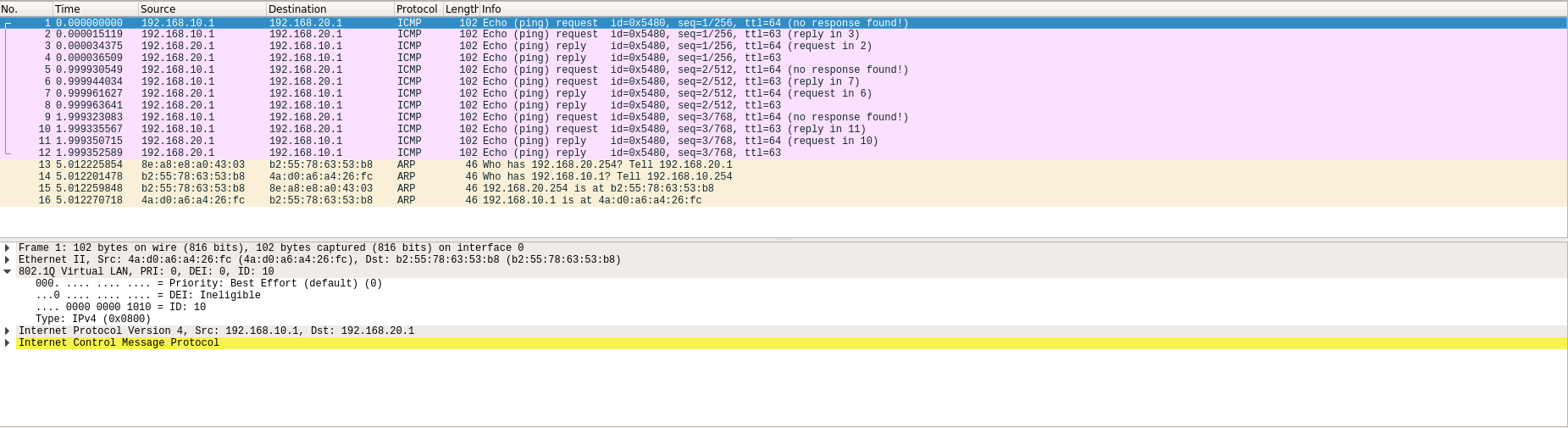
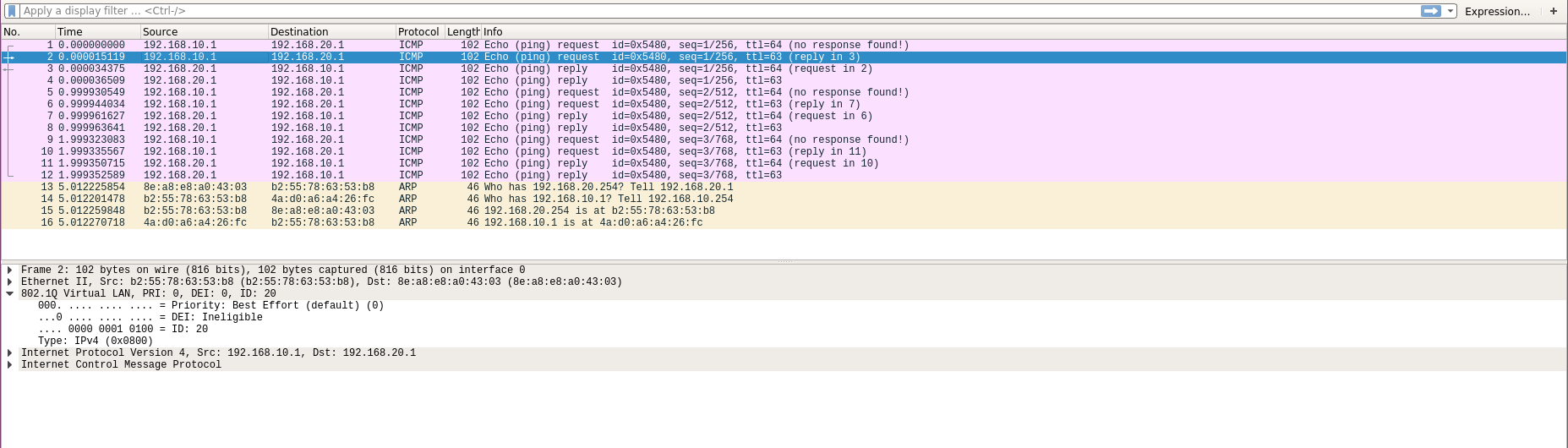
数据包在穿过网桥送往路由器时会被打上一个特殊标签
从vlan.10发往router时
从vlan.20发往router时

7. Mininet中OVS的基本操作

OVS 基本指令

1. ovs-ofctl show

显示OVS交换机的基本信息
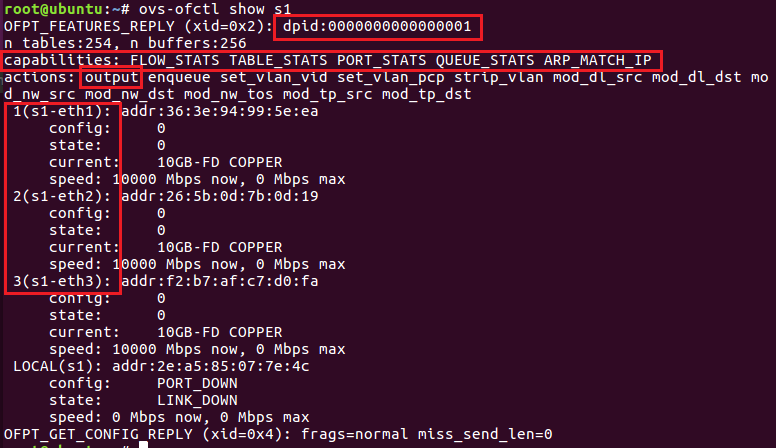
dpid -> OVS 交换机的唯一ID

capabilities -> 交换机具有的能力

actions -> 交换机可执行的操作 例如:

  • output 转发输出
  • mod_nw_dst 修改目的地址
    等等

1,2,3 为该交换机具有的端口及其端口号

2. ovs-ofctl add-flow

添加交换机的规则
例如 ovs-ofctl add-flow s1 in_port=1,actions:output:2

3. ovs-ofctl del-flows

删除该交换机上所有规则

4. ovs-ofctl del-flows

删除该交换机上匹配的规则
例如 ovs-ofctl del-flows s1 in_port=1
该指令将删除in_port=1对应的规则

5. ovs-ofctl dump-flows

显示该交换机上所有规则

OVS 操作

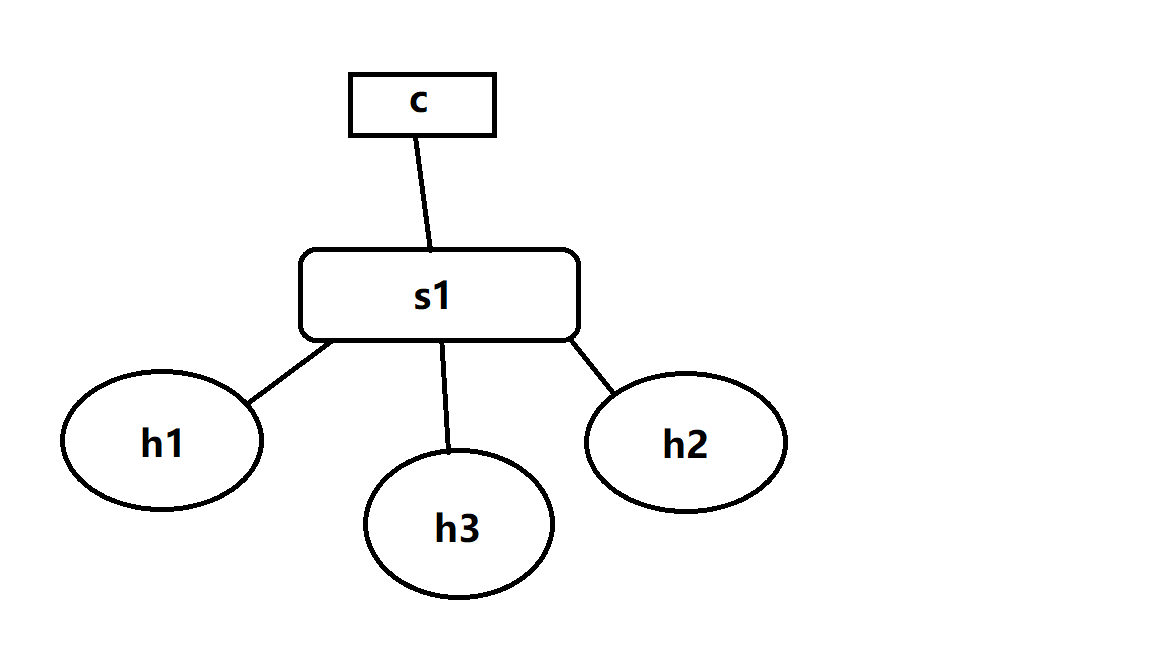
1.两台主机的简单拓扑
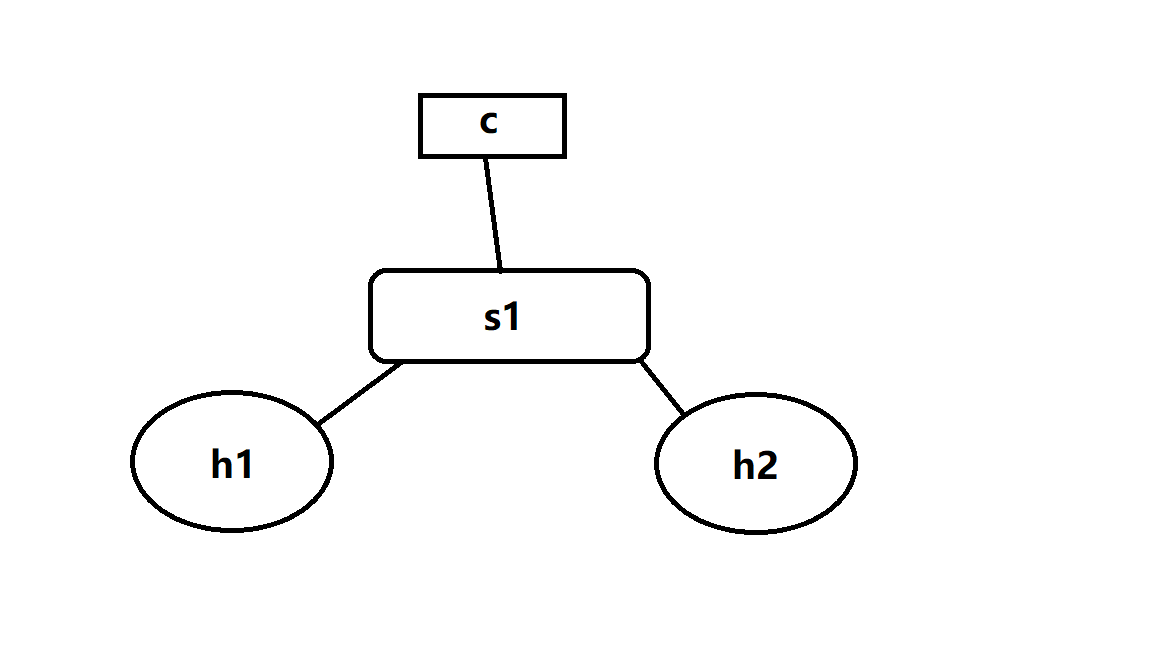
通过mininet --topo sigle,2
建立拥有1台switch 两台host的拓扑

首先 使用ps -aux | grep controller
获得controller的PID 然后使用 kill -9 <PID> 杀掉controller

  • ovs-ofctl add-flow s1 in_port=1,actions=output:2 将1口数据包转发到2口
  • ovs-ofctl add-flow s1 in_port=2,actions=output:1 将2口数据包转发到1口

此时 两台主机可以ping通

2.三台主机的拓扑

通过mininet --topo sigle,3
建立拥有1台switch 三台host的拓扑

首先 使用ps -aux | grep controller
获得controller的PID 然后使用 kill -9 <PID> 杀掉controller

  • ovs-ofctl add-flow s1 in_port=1,arp,actions=output:flood 将1口的arp数据包泛洪
  • ovs-ofctl add-flow s1 in_port=2,arp,actions=output:flood 将2口的arp数据包泛洪
  • ovs-ofctl add-flow s1 in_port=3,arp,actions=output:flood 将3口的arp数据包泛洪
  • ovs-ofctl add-flow s1 ip,nw_dst=10.0.0.1,actions=output:1 将发往10.0.0.1的数据转发到1口
  • ovs-ofctl add-flow s1 ip,nw_dst=10.0.0.2,actions=output:2 将发往10.0.0.2的数据转发到2口
  • ovs-ofctl add-flow s1 ip,nw_dst=10.0.0.3,actions=output:3 将发往10.0.0.3的数据转发到3口

此时 三台主机可以互相ping通


8. Mininet中SSH服务配置

  • 使用 netstat -tunlp | grep 22 查看sshd是否已经运行
  • 使用 which sshd 获得sshd位置
  • 使用完整路径启动sshd(不能使用systemctl或者service

9. containernet介绍

1. 切换到containernet环境

1
2
cd /home/user/containernet
python3 ./setup.py install

2. 创建需要的docker镜像

1
2
docker pull ubuntu:16.04
docker run -it ubuntu:16.04 bash

在docker环境内 安装需要的软件 并创建用户

1
2
3
apt update
apt install net-tools iputils-ping iproute openssh-server
adduser user

完成后 新建一个终端 使用docker ps查看正在运行的镜像 获得container-id
然后使用docker commit <container-id> <name:tag>
将当前container保存为image
本次创建了两个镜像 ubuntu:sshd1 ubuntu:sshd2

然后编写脚本

1
2
3
4
5
6
7
8
9
10
11
12
13
14
15
16
17
18
19
20
21
22
23
24
25
26
27
28
#!/usr/bin/python

from mininet.net import Containernet
from mininet.node import Controller
from mininet.cli import CLI
from mininet.link import TCLink
from mininet.log import info, setLogLevel
setLogLevel('info')

net = Containernet(controller=Controller)
info('*** Adding controller ***')
net.addController('c0')
info('*** Adding docker containers ***')
h1 = net.addHost('h1', ip='10.0.0.250/24')
d1 = net.addDocker('d1', ip='10.0.0.251/24', dimage='ubuntu:sshd1')
d2 = net.addDocker('d2', ip='10.0.0.252/24', dimage='ubuntu:sshd2')
info('*** Adding switches ***')
s1 = net.addSwitch('s1')
info('*** Creating links ***')
net.addLink(h1, s1)
net.addLink(d1, s1)
net.addLink(d2, s1)
info('*** Starting network ***')
net.start()
info('*** Runing CLI ***')
CLI(net)
info('*** Stopping network ***')
net.stop()

运行脚本后 可以使用docker ps查看到正在运行的容器

可以使用docker exec -it mn.d1 bash进入d1主机 然后使用ifconfig检查IP是否设定正确
最后使用/etc/init.d/ssh start开启ssh服务
对d2执行相同操作即可
然后在mininet控制台 使用xterm h1 开启h1的终端
输入ssh user@10.0.0.251可以远程登录到d1主机
输入ssh user@10.0.0.252可以远程登录到d2主机


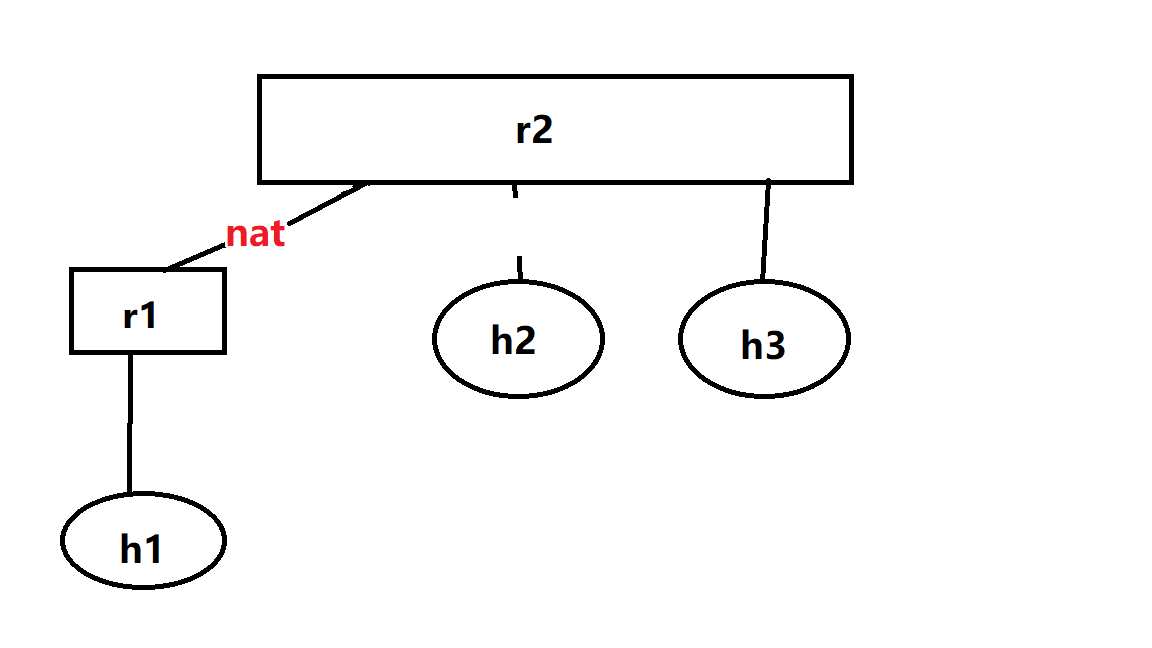
10. Mininet 应用-如何建立反向代理

前置准备

  • 安装golang
  • 从GitHub克隆frp 并编译出可执行文件

拓扑结构

使用的脚本

1
2
3
4
5
6
7
8
9
10
11
12
13
14
15
16
17
18
19
20
21
22
23
24
25
26
27
28
29
30
31
32
33
34
35
36
37
38
39
40
41
42
43
44
45
46
47
48
49
50
51
52
#!/usr/bin/python
from mininet.net import Mininet
from mininet.link import Link, TCLink
from mininet.cli import CLI
from mininet.log import setLogLevel


def topology():
net = Mininet()

h1 = net.addHost("h1", ip="192.168.1.1/24")
h2 = net.addHost("h2", ip="1.1.1.1/24")
h3 = net.addHost("h3", ip="2.2.2.2/24")
r1 = net.addHost("r1")
r2 = net.addHost("r2")

net.addLink(h1, r1)
net.addLink(r1, r2)
net.addLink(r2, h2)
net.addLink(r2, h3)

net.build()

r1.cmd("echo 1 > /proc/sys/net/ipv4/ip_forward")
r2.cmd("echo 1 > /proc/sys/net/ipv4/ip_forward")
r1.cmd("ifconfig r1-eth0 0")
r1.cmd("ifconfig r1-eth1 0")
r2.cmd("ifconfig r2-eth0 0")
r2.cmd("ifconfig r2-eth1 0")
r2.cmd("ifconfig r2-eth2 0")
r1.cmd("ip addr add 192.168.1.254/24 brd + dev r1-eth0")
r1.cmd("ip addr add 12.1.1.1/24 brd + dev r1-eth1")
r2.cmd("ip addr add 12.1.1.2/24 brd + dev r2-eth0")
r2.cmd("ip addr add 1.1.1.254/24 brd + dev r2-eth1")
r2.cmd("ip addr add 2.2.2.254/24 brd + dev r2-eth2")
h1.cmd("ip route add default via 192.168.1.254")
h2.cmd("ip route add default via 1.1.1.254")
h3.cmd("ip route add default via 2.2.2.254")
r2.cmd("ip route add 12.1.1.0/24 via 12.1.1.1")
r1.cmd("ip route add 1.1.1.0/24 via 12.1.1.2")
r1.cmd("ip route add 2.2.2.0/24 via 12.1.1.2")
r1.cmd("iptables -t nat -A POSTROUTING -s 192.168.1.0/24 -o r1-eth1 -j MASQUERADE")

CLI(net)

net.stop()


if "__main__" == __name__:
setLogLevel('info')
topology()

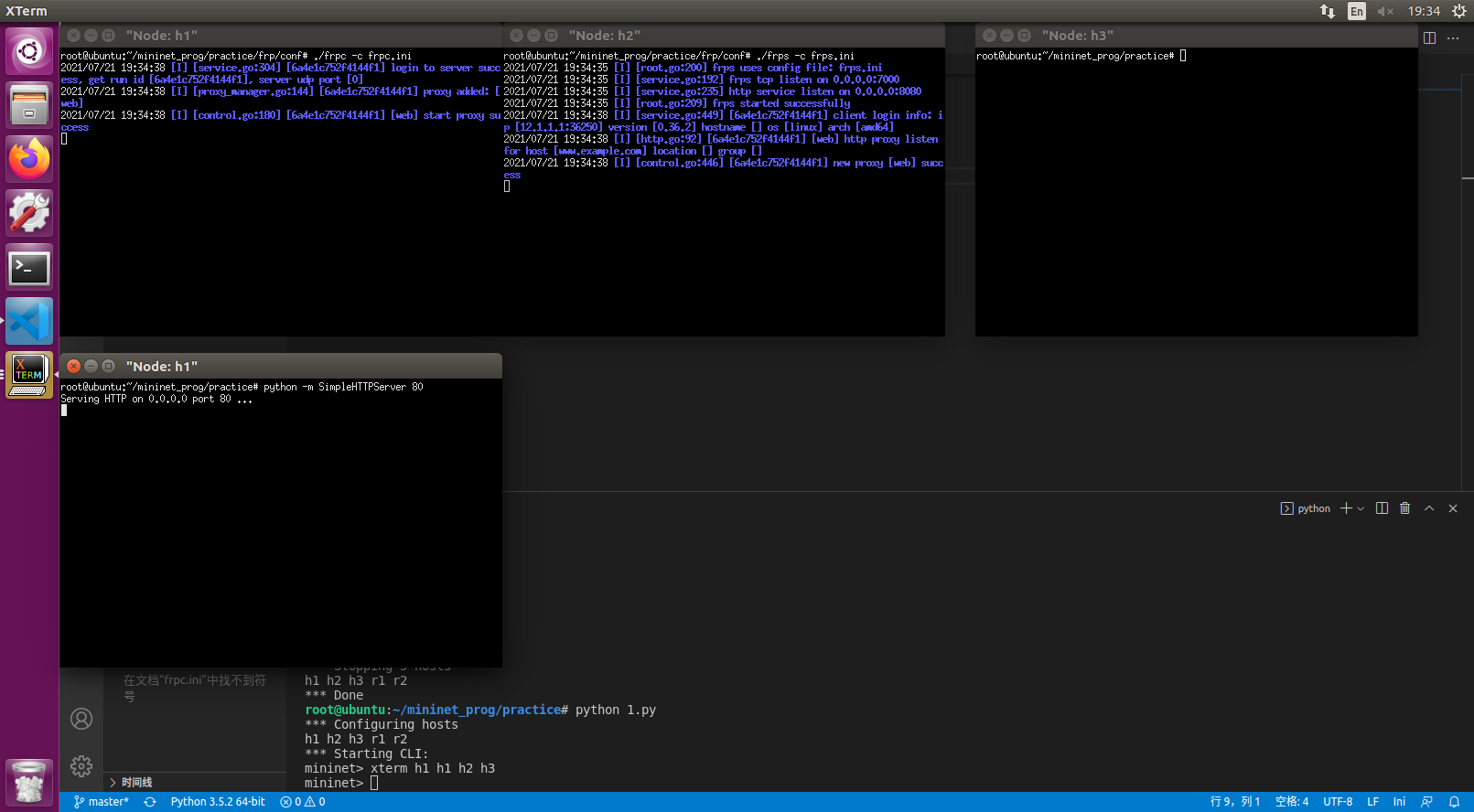
操作步骤

  • 运行脚本 建立拓扑结构
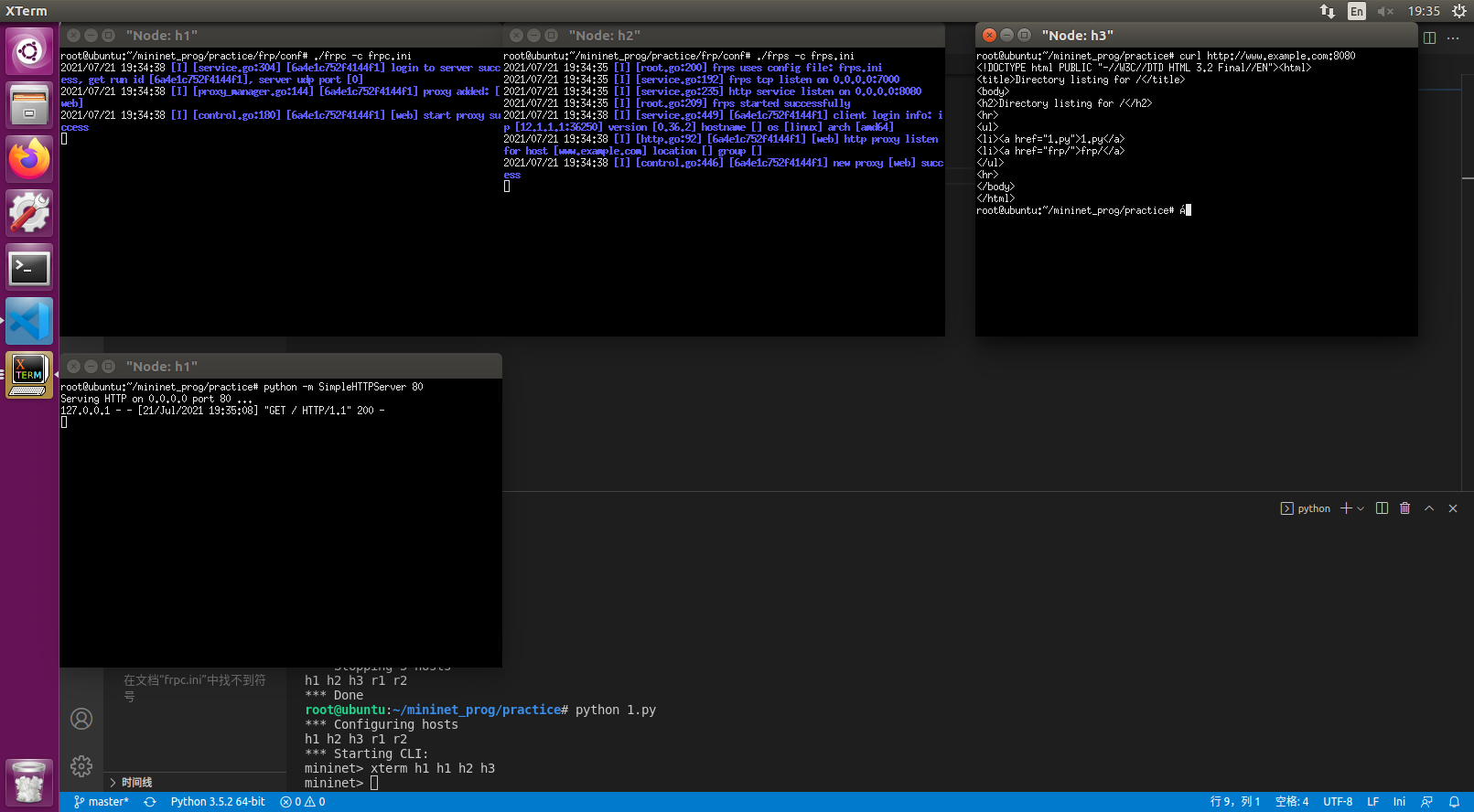
  • xterm h1 h1 h2 h3
  • 在其中一个h1终端上 执行python -m SimpleHTTPServer 80
  • 在h2上编辑frps.ini 内容如下
    frps.ini
    1
    2
    3
    [common]
    bind_port = 7000
    vhost_http_port = 8080
  • h2运行frps -c frps.ini
  • h1另一台终端编辑frpc.ini
    frpc.ini
    1
    2
    3
    4
    5
    6
    7
    8
    [common]
    server_addr = 1.1.1.1
    server_port = 7000

    [web]
    type = http
    local_port = 80
    custom_domains = www.example.com
  • 在h1运行frpc -c frpc.ini
  • /etc/hosts添加1.1.1.1 www.example.com
  • 在h3可以使用curl www.example.com:8080取得网页

11. Mininet 应用-如何建立SSH隧道

本节将介绍ssh的三种转发方式
本节使用containernet

1. Local Forwarding

简单的点对点拓扑

拓扑结构如下
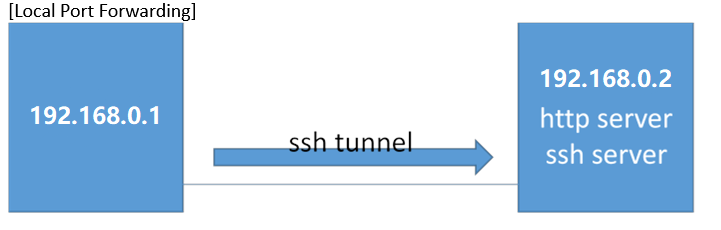
目标:访问在192.168.0.2上的http页面 但是通过ssh加密

mininet脚本:

1
2
3
4
5
6
7
8
9
10
11
12
13
14
15
16
17
18
19
20
21
22
23
24
25
26
27
28
29
30
#!/user/bin/python
from mininet.net import Containernet
from mininet.node import Docker
from mininet.cli import CLI
from mininet.log import setLogLevel,info
from mininet.link import TCLink,Link

def topology():
net=Containernet()

info("Adding hosts")
h1=net.addHost('h1',ip='192.168.0.1/24')
d1=net.addDocker('d1',ip='192.168.0.2/24',dimage='smallko/php-apache-dev:v10')

info("Create links")
net.addLink(h1,d1)

info("Starting network")
net.start()
d1.cmd("/etc/init.d/ssh start")

info("Running CLI")
CLI(net)

info("Atopping network")
net.stop()

if __name__=="__main__":
setLogLevel('info')
topology()

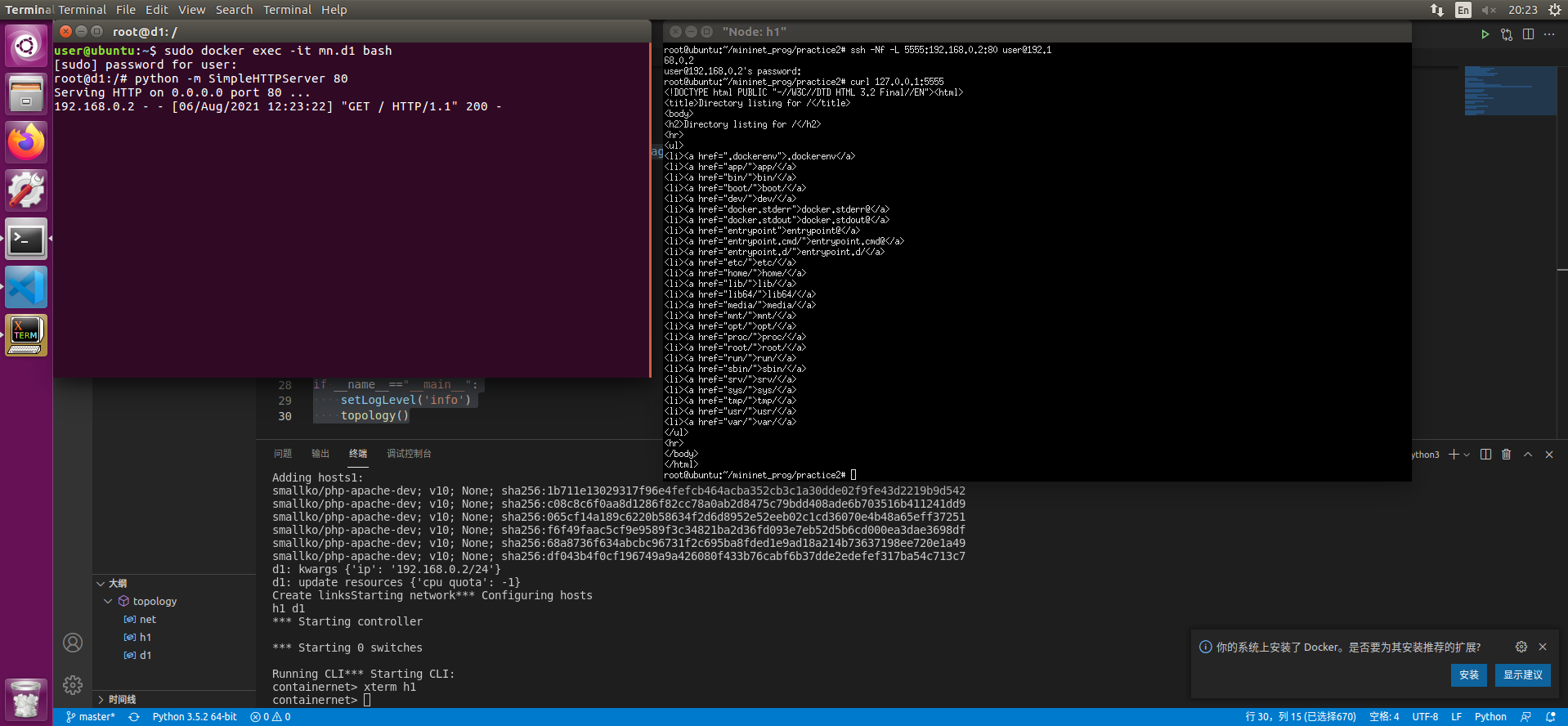
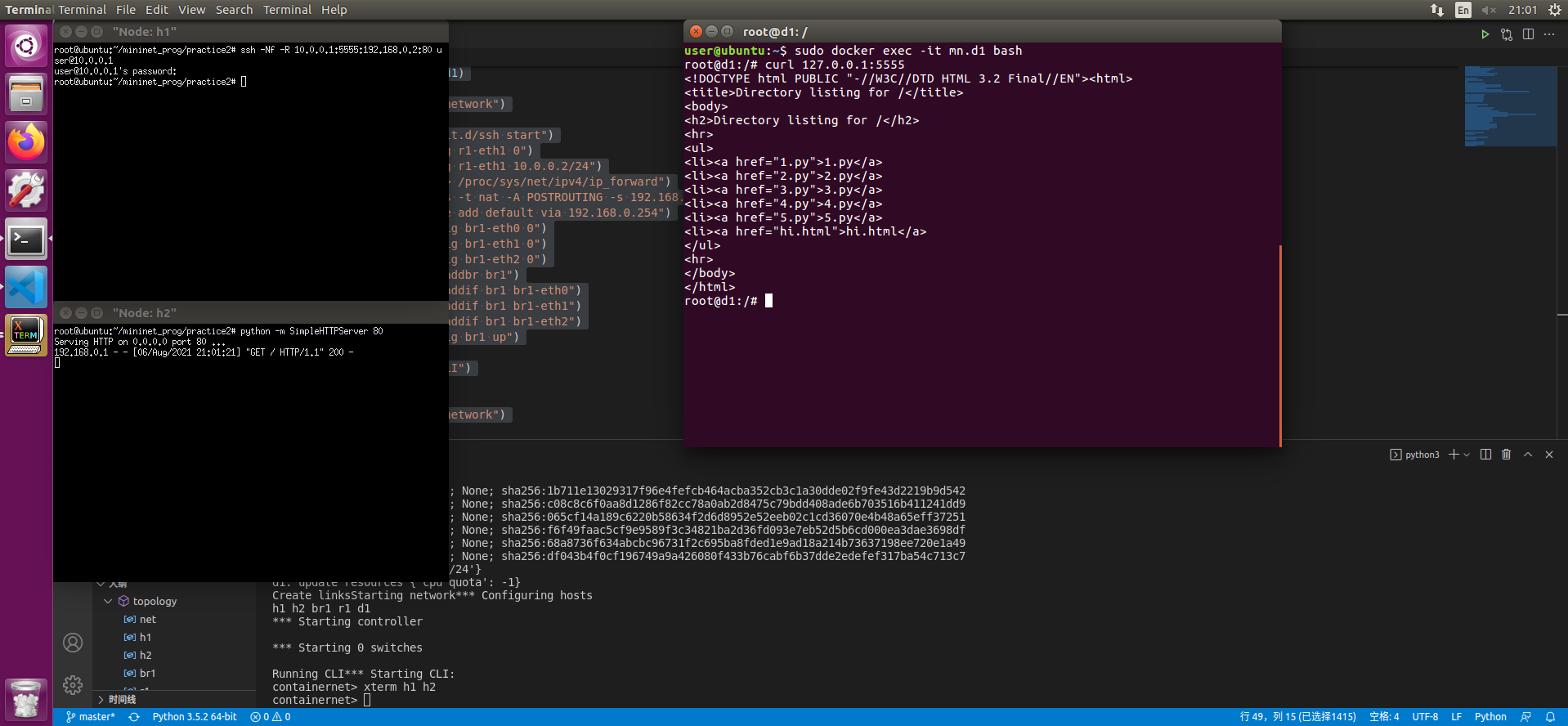
  • 打开一个终端 使用sudo docker exec -it mn.d1 bash打开d1的终端
  • 在其中输入python -m SimpleHTTPServer 80
  • 在CLI中输入xterm h1
  • 在h1终端中使用ssh -Nf -L 5555:192.168.0.2:80 user@192.168.0.2
  • 输入密码建立链接 此时可以使用curl 127.0.0.1:5555获得远端服务器的内容

带有中间主机的点对点访问

拓扑结构如下
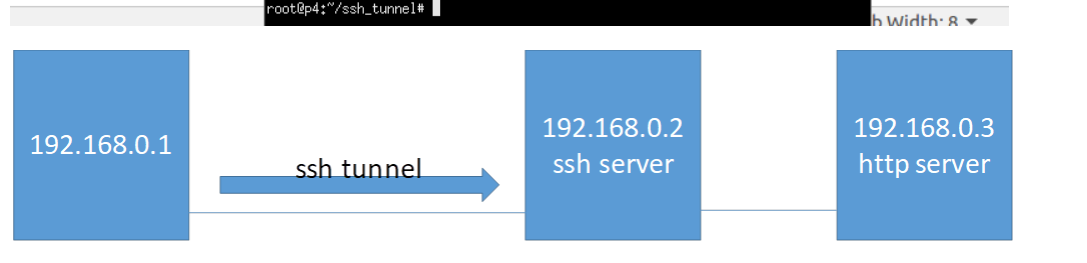
目标:通过192.168.0.2访问在192.168.0.3上的http页面 但是通过ssh加密

mininet脚本:

1
2
3
4
5
6
7
8
9
10
11
12
13
14
15
16
17
18
19
20
21
22
23
24
25
26
27
28
29
30
31
32
33
34
35
36
37
38
39
40
41
42
#!/user/bin/python
from mininet.net import Containernet
from mininet.node import Docker
from mininet.cli import CLI
from mininet.log import setLogLevel,info
from mininet.link import TCLink,Link

def topology():
net=Containernet()

info("Adding hosts")
h1=net.addHost('h1',ip='192.168.0.1/24')
d1=net.addDocker('d1',ip='192.168.0.2/24',dimage='smallko/php-apache-dev:v10')
h2=net.addHost('h2',ip='192.168.0.3/24')
br1=net.addHost('br1')

info("Create links")
net.addLink(h1,br1)
net.addLink(d1,br1)
net.addLink(h2,br1)

info("Starting network")
net.start()
d1.cmd("/etc/init.d/ssh start")
br1.cmd("ifconfig br1-eth0 0")
br1.cmd("ifconfig br1-eth1 0")
br1.cmd("ifconfig br1-eth2 0")
br1.cmd("brctl addbr br1")
br1.cmd("brctl addif br1 br1-eth0")
br1.cmd("brctl addif br1 br1-eth1")
br1.cmd("brctl addif br1 br1-eth2")
br1.cmd("ifconfig br1 up")

info("Running CLI")
CLI(net)

info("Atopping network")
net.stop()

if __name__=="__main__":
setLogLevel('info')
topology()

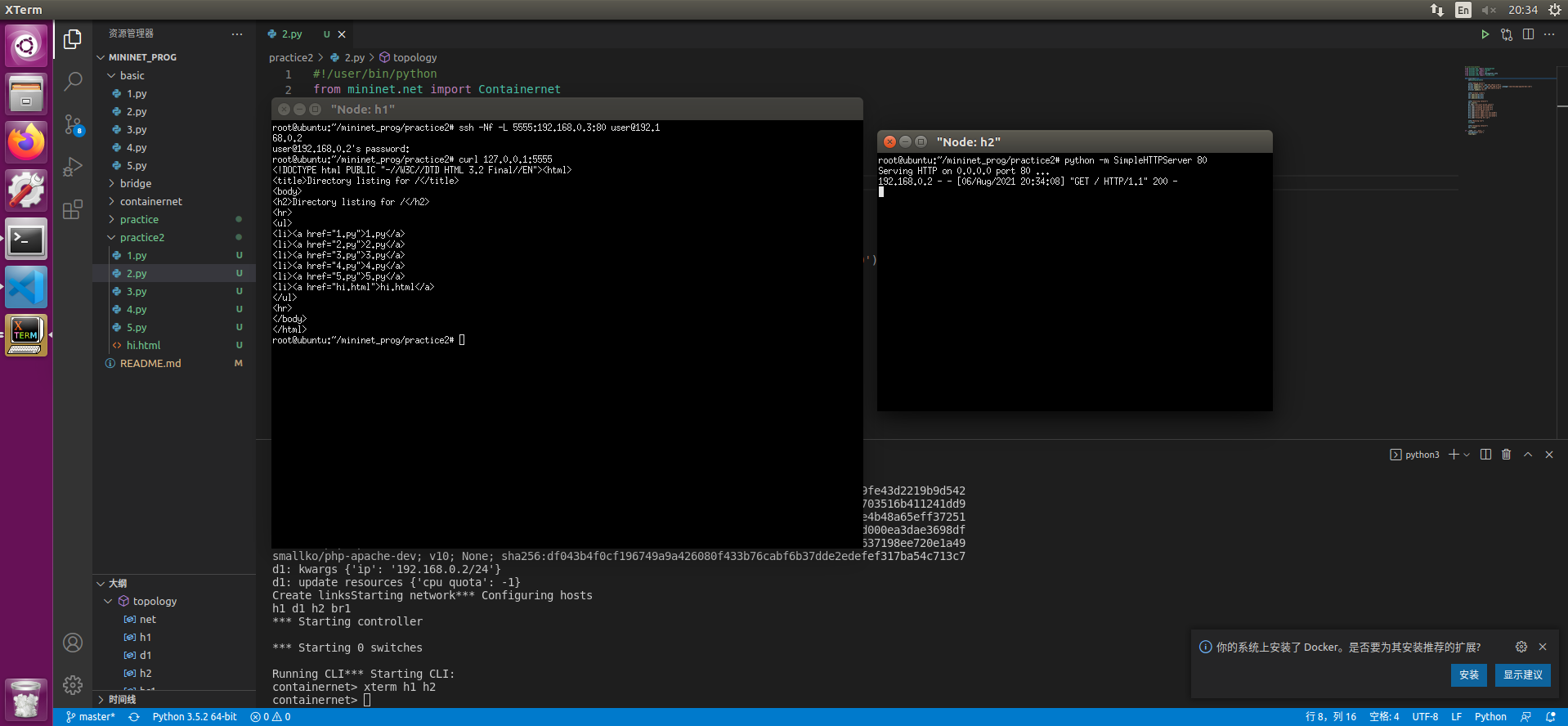
  • 在CLI中输入xterm h1 h2
  • 在h2终端输入python -m SimpleHTTPServer 80
  • 在h1终端中使用ssh -Nf -L 5555:192.168.0.3:80 user@192.168.0.2
  • 输入密码建立链接 此时可以使用curl 127.0.0.1:5555获得远端服务器的内容

2. Local Forwarding

从外网穿透访问内网服务器

拓扑结构如下
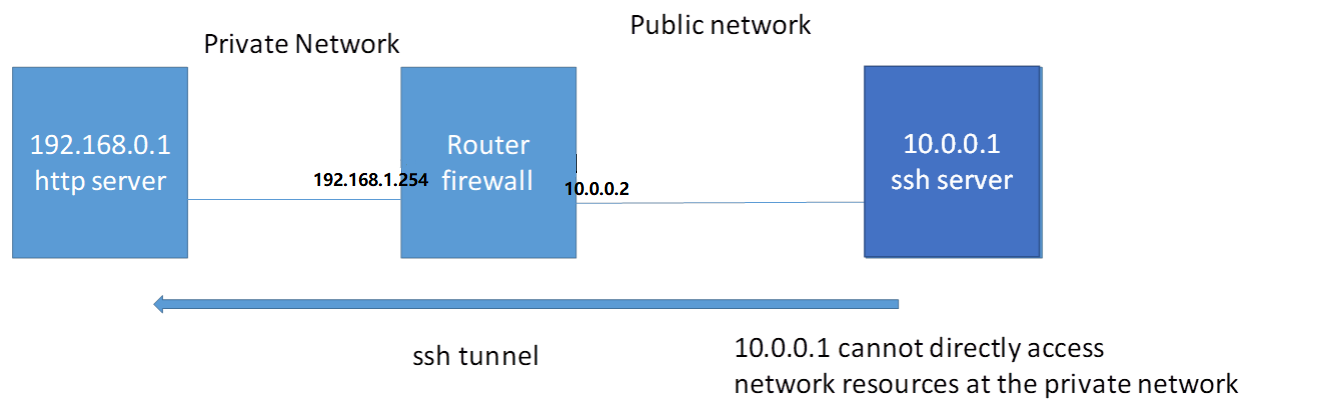
目标: 由于路由器的NAT public network 不能直接存取 private network 的内容 使用ssh远程穿透路由器以达到存取内网内容的目的

mininet脚本:

1
2
3
4
5
6
7
8
9
10
11
12
13
14
15
16
17
18
19
20
21
22
23
24
25
26
27
28
29
30
31
32
33
34
35
36
37
#!/user/bin/python
from mininet.net import Containernet
from mininet.node import Docker
from mininet.cli import CLI
from mininet.log import setLogLevel,info
from mininet.link import TCLink,Link

def topology():
net=Containernet()

info("Adding hosts")
h1=net.addHost('h1',ip='192.168.0.1/24')
r1=net.addHost('r1',ip='192.168.0.254/24')
d1=net.addDocker('d1',ip='10.0.0.1/24',dimage='smallko/php-apache-dev:v10')

info("Create links")
net.addLink(h1,r1)
net.addLink(r1,d1)

info("Starting network")
net.start()
d1.cmd("/etc/init.d/ssh start")
r1.cmd("ifconfig r1-eth1 0")
r1.cmd("ifconfig r1-eth1 10.0.0.2/24")
r1.cmd("echo 1 > /proc/sys/net/ipv4/ip_forward")
r1.cmd("iptables -t nat -A POSTROUTING -s 192.168.0.0/24 -o r1-eth1 -j MASQUERADE")
h1.cmd("ip route add default via 192.168.0.254")

info("Running CLI")
CLI(net)

info("Atopping network")
net.stop()

if __name__=="__main__":
setLogLevel('info')
topology()

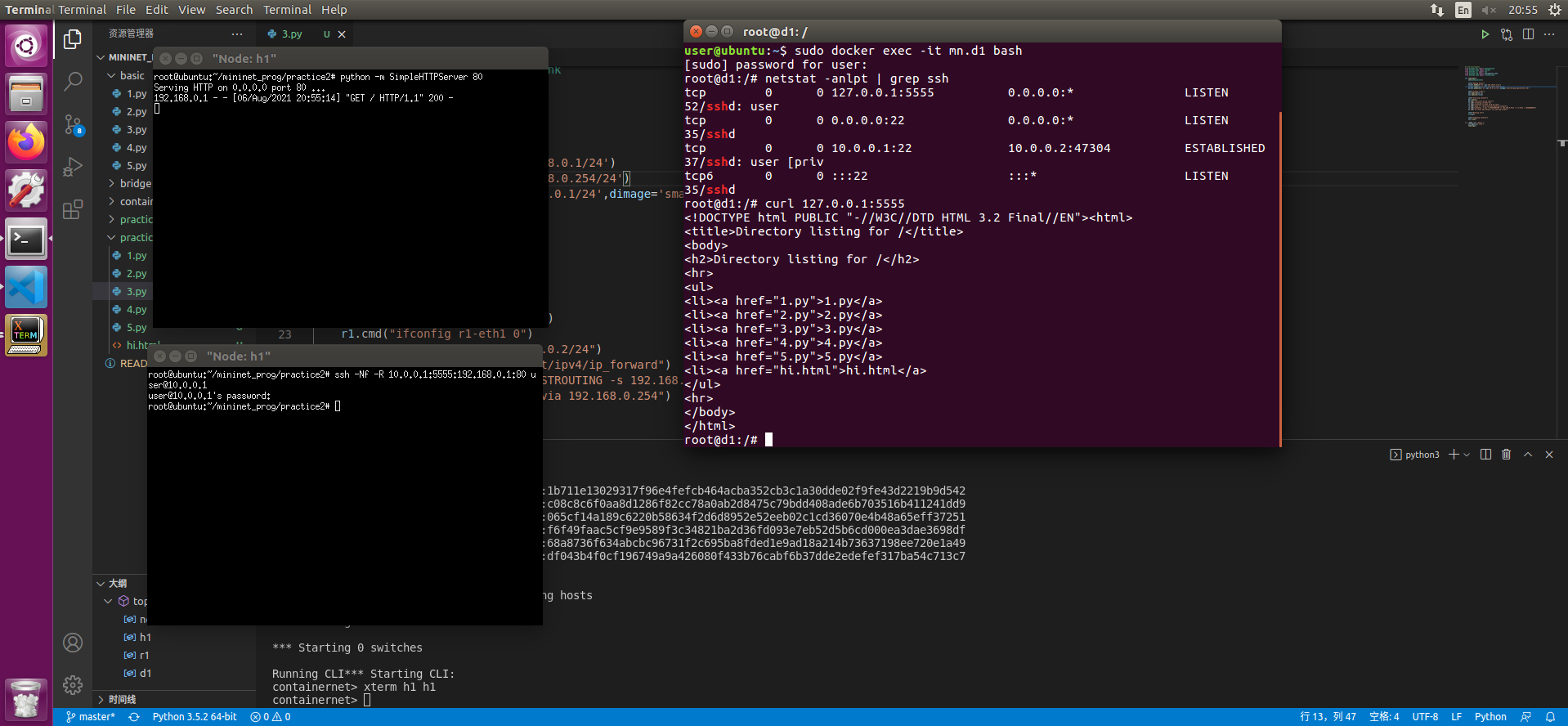
  • 在CLI中输入xterm h1 h1
  • 在一个h1终端输入python -m SimpleHTTPServer 80
  • 在另一个h1终端中使用ssh -Nf -R 10.0.0.1:5555:192.168.0.1:80 user@10.0.0.1 输入密码
  • 开启一个终端 输入sudo docker exec -it mn.d1 bash
  • 使用curl 127.0.0.1:5555即可访问192.168.0.1的内容

更复杂的情况

拓扑结构如下
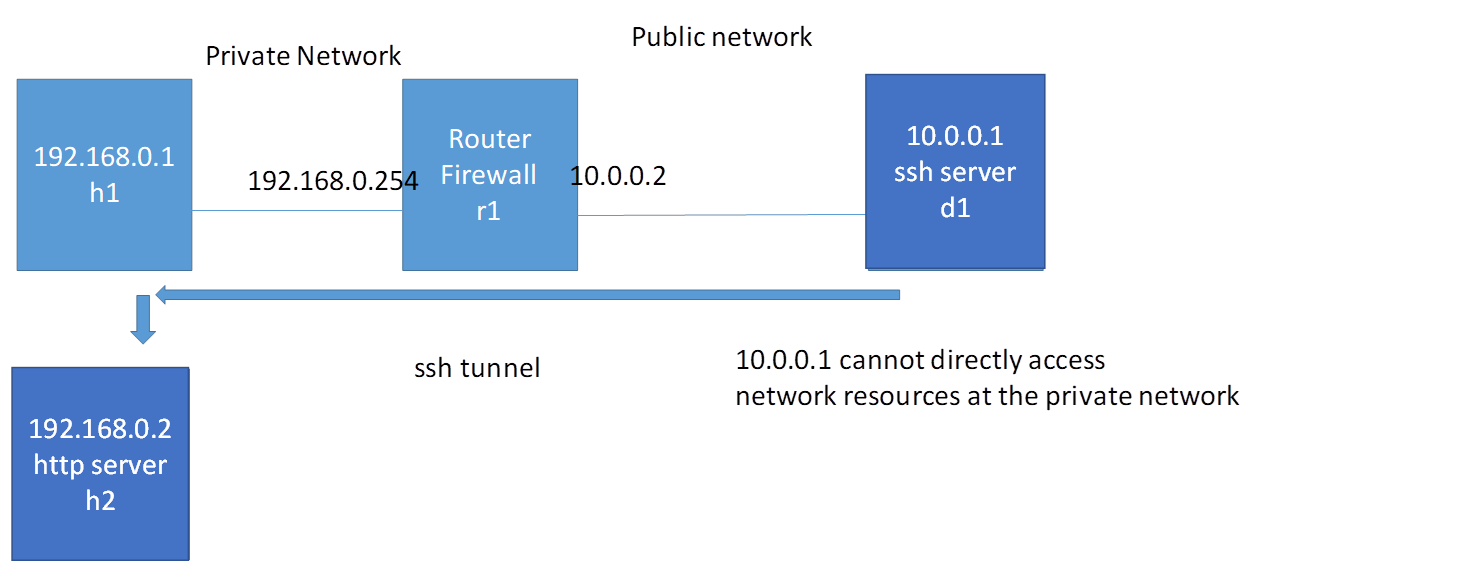
目标: 存取内网的另一台主机

mininet脚本:

1
2
3
4
5
6
7
8
9
10
11
12
13
14
15
16
17
18
19
20
21
22
23
24
25
26
27
28
29
30
31
32
33
34
35
36
37
38
39
40
41
42
43
44
45
46
47
48
49
#!/user/bin/python
from mininet.net import Containernet
from mininet.node import Docker
from mininet.cli import CLI
from mininet.log import setLogLevel,info
from mininet.link import TCLink,Link

def topology():
net=Containernet()

info("Adding hosts")
h1=net.addHost('h1',ip='192.168.0.1/24')
h2=net.addHost('h2',ip='192.168.0.2/24')
br1=net.addHost('br1')
r1=net.addHost('r1',ip='192.168.0.254/24')
d1=net.addDocker('d1',ip='10.0.0.1/24',dimage='smallko/php-apache-dev:v10')

info("Create links")
net.addLink(h1,br1)
net.addLink(h2,br1)
net.addLink(r1,br1)
net.addLink(r1,d1)

info("Starting network")
net.start()
d1.cmd("/etc/init.d/ssh start")
r1.cmd("ifconfig r1-eth1 0")
r1.cmd("ifconfig r1-eth1 10.0.0.2/24")
r1.cmd("echo 1 > /proc/sys/net/ipv4/ip_forward")
r1.cmd("iptables -t nat -A POSTROUTING -s 192.168.0.0/24 -o r1-eth1 -j MASQUERADE")
h1.cmd("ip route add default via 192.168.0.254")
br1.cmd("ifconfig br1-eth0 0")
br1.cmd("ifconfig br1-eth1 0")
br1.cmd("ifconfig br1-eth2 0")
br1.cmd("brctl addbr br1")
br1.cmd("brctl addif br1 br1-eth0")
br1.cmd("brctl addif br1 br1-eth1")
br1.cmd("brctl addif br1 br1-eth2")
br1.cmd("ifconfig br1 up")

info("Running CLI")
CLI(net)

info("Atopping network")
net.stop()

if __name__=="__main__":
setLogLevel('info')
topology()

  • 在CLI中输入xterm h1 h2
  • 在h2终端输入python -m SimpleHTTPServer 80
  • 在h1终端中使用ssh -Nf -R 10.0.0.1:5555:192.168.0.2:80 user@10.0.0.1 输入密码
  • 开启一个终端 输入sudo docker exec -it mn.d1 bash
  • 使用curl 127.0.0.1:5555即可访问192.168.0.1的内容

3. Dynamic Forwarding

拓扑结构如下
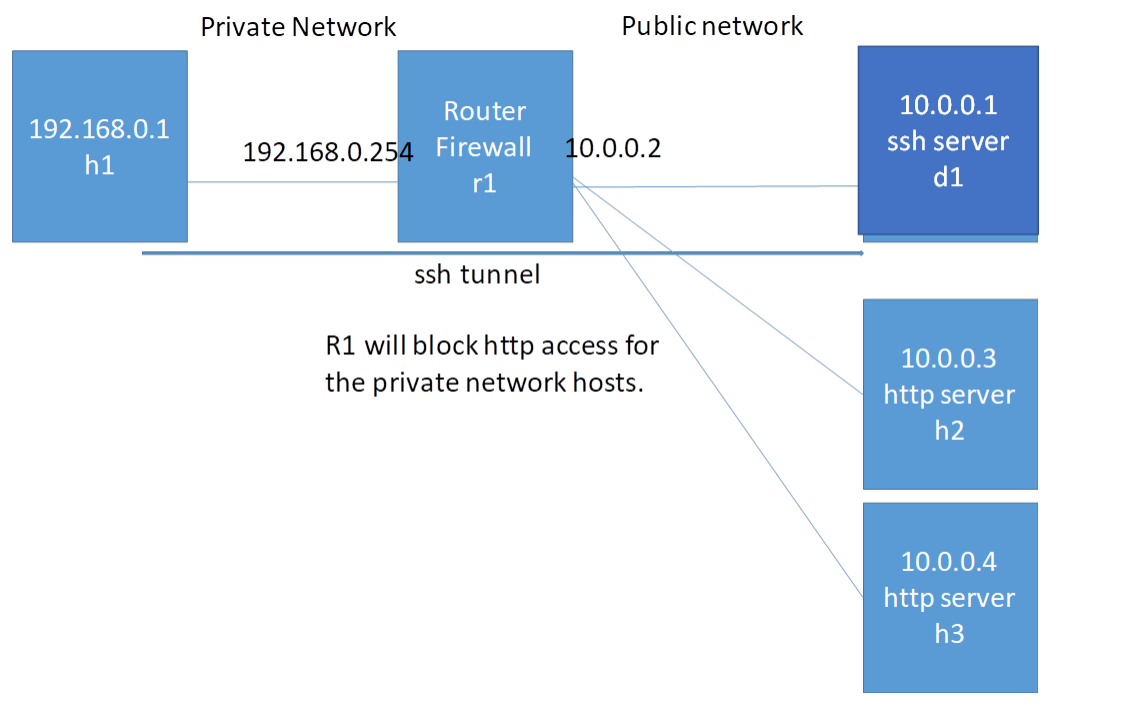
目标: 在这个拓扑中 r1阻止了对外网的80端口的访问 此时可以使用ssh完成对远程服务器80端口的存取

mininet脚本:

1
2
3
4
5
6
7
8
9
10
11
12
13
14
15
16
17
18
19
20
21
22
23
24
25
26
27
28
29
30
31
32
33
34
35
36
37
38
39
40
41
42
43
44
45
46
47
48
49
50
51
52
53
54
#!/user/bin/python
from mininet.net import Containernet
from mininet.node import Docker
from mininet.cli import CLI
from mininet.log import setLogLevel,info
from mininet.link import TCLink,Link

def topology():
net=Containernet()

info("Adding hosts")
h1=net.addHost('h1',ip='192.168.0.1/24')
r1=net.addHost('r1',ip='192.168.0.254/24')
d1=net.addDocker('d1',ip='10.0.0.1/24',dimage='smallko/php-apache-dev:v10')
br1=net.addHost('br1')
h2=net.addHost('h2',ip='10.0.0.3/24')
h3=net.addHost('h3',ip='10.0.0.4/24')

info("Create links")
net.addLink(h1,r1)
net.addLink(r1,br1)
net.addLink(d1,br1)
net.addLink(h2,br1)
net.addLink(h3,br1)

info("Starting network")
net.start()
d1.cmd("/etc/init.d/ssh start")
r1.cmd("ifconfig r1-eth1 0")
r1.cmd("ifconfig r1-eth1 10.0.0.2/24")
r1.cmd("echo 1 > /proc/sys/net/ipv4/ip_forward")
r1.cmd("iptables -t nat -A POSTROUTING -s 192.168.0.0/24 -o r1-eth1 -j MASQUERADE")
r1.cmd("iptables -A FORWARD -s 192.168.0.0/24 -p tcp --dport 80 -j REJECT") # 阻止80端口访问
h1.cmd("ip route add default via 192.168.0.254")
br1.cmd("ifconfig br1-eth0 0")
br1.cmd("ifconfig br1-eth1 0")
br1.cmd("ifconfig br1-eth2 0")
br1.cmd("ifconfig br1-eth3 0")
br1.cmd("brctl addbr br1")
br1.cmd("brctl addif br1 br1-eth0")
br1.cmd("brctl addif br1 br1-eth1")
br1.cmd("brctl addif br1 br1-eth2")
br1.cmd("brctl addif br1 br1-eth3")
br1.cmd("ifconfig br1 up")

info("Running CLI")
CLI(net)

info("Atopping network")
net.stop()

if __name__=="__main__":
setLogLevel('info')
topology()

准备一个网页hi.html
1
2
3
4
5
6
<!DOCTYPE HTML>
<html>
<body>
<h1>Hi</h1>
</body>
</html>

  • 在CLI中输入xterm h1 h2 h3
  • 在h2和还h3终端输入python -m SimpleHTTPServer 80
    此时尝试从h1 ping h2和h3 是可以ping通的
    但是curl无法存取80端口的网页hi.html
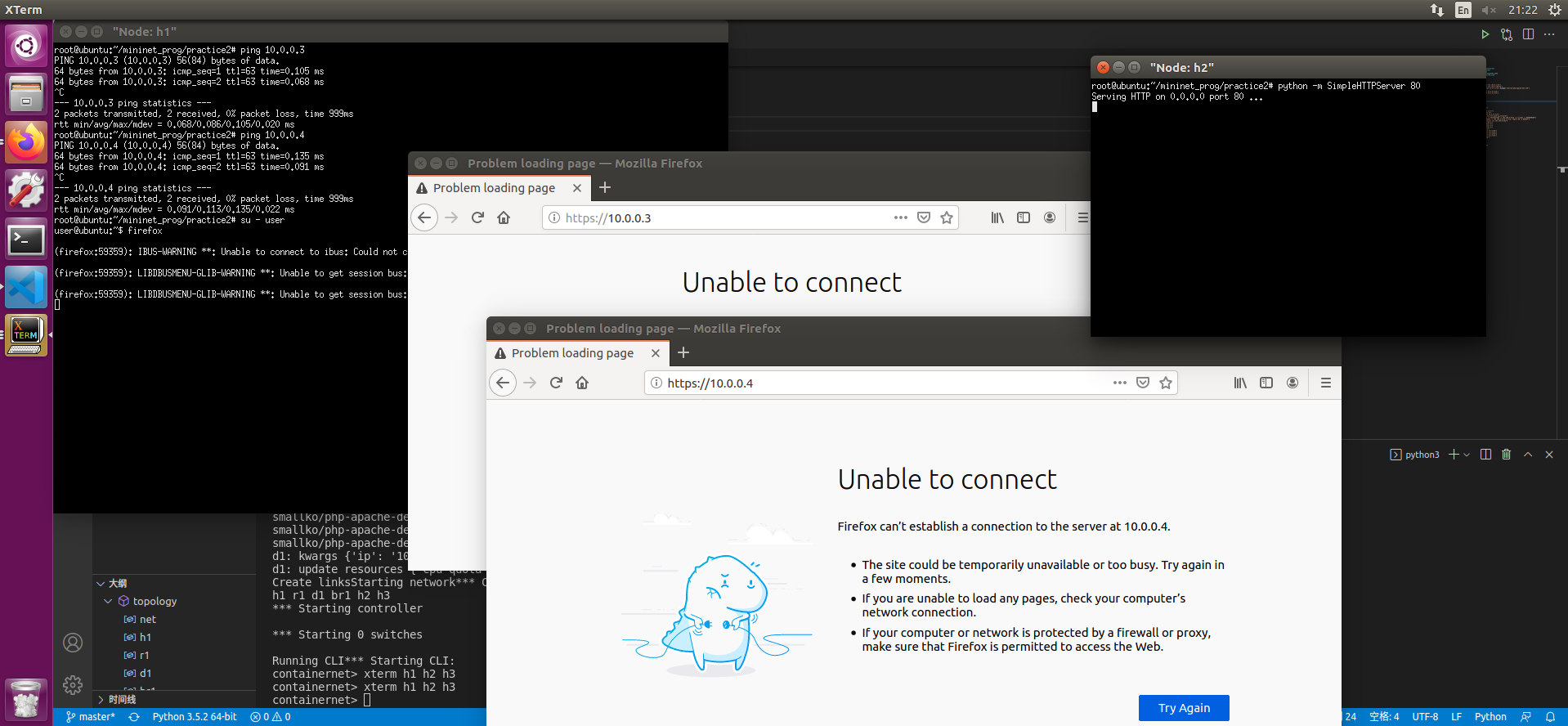
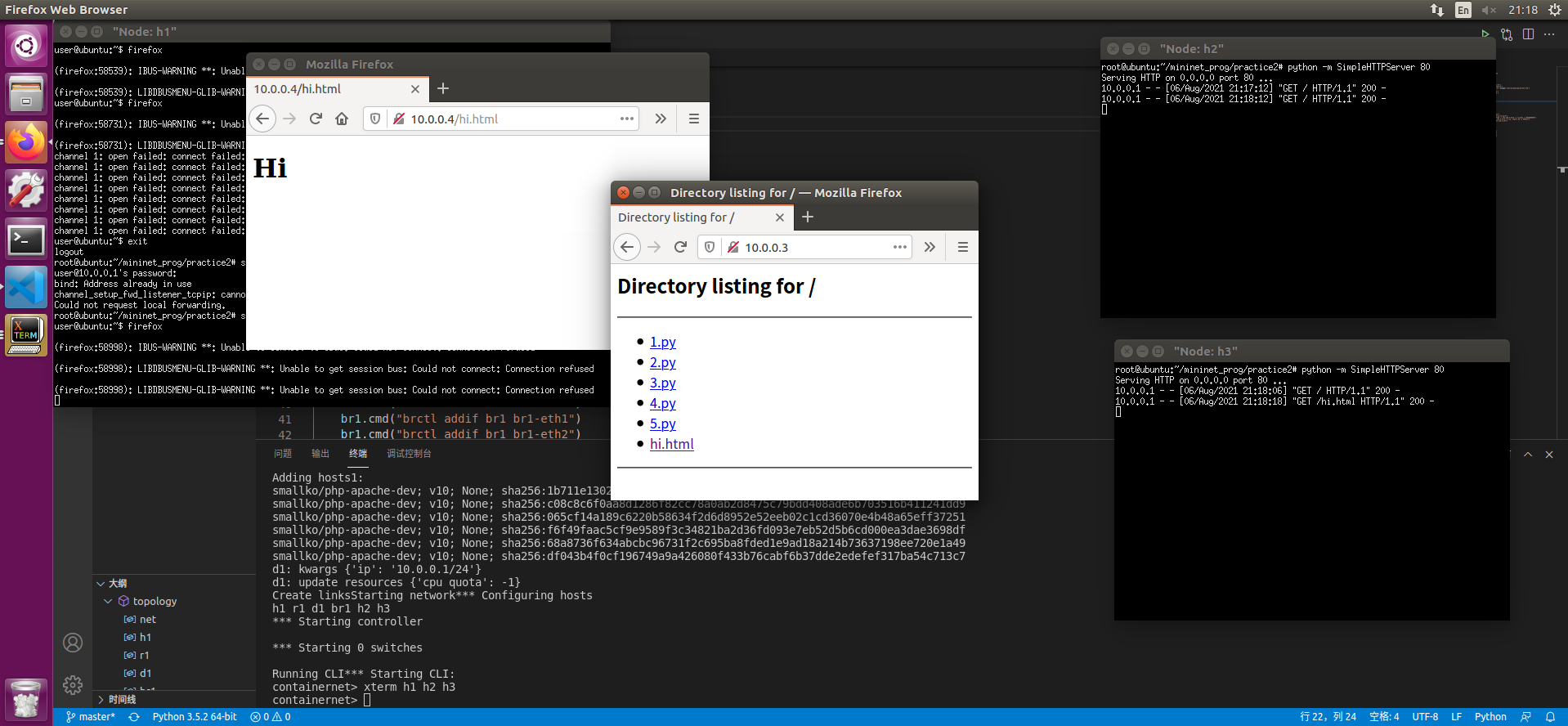
  • 在h1终端中使用ssh -Nf -D 127.0.0.1:8080 user@10.0.0.1 输入密码
  • 在h1终端中使用su - user切换到普通用户
  • 使用firefox打开firefox 设置中设置SockV5代理为127.0.0.1 8080端口
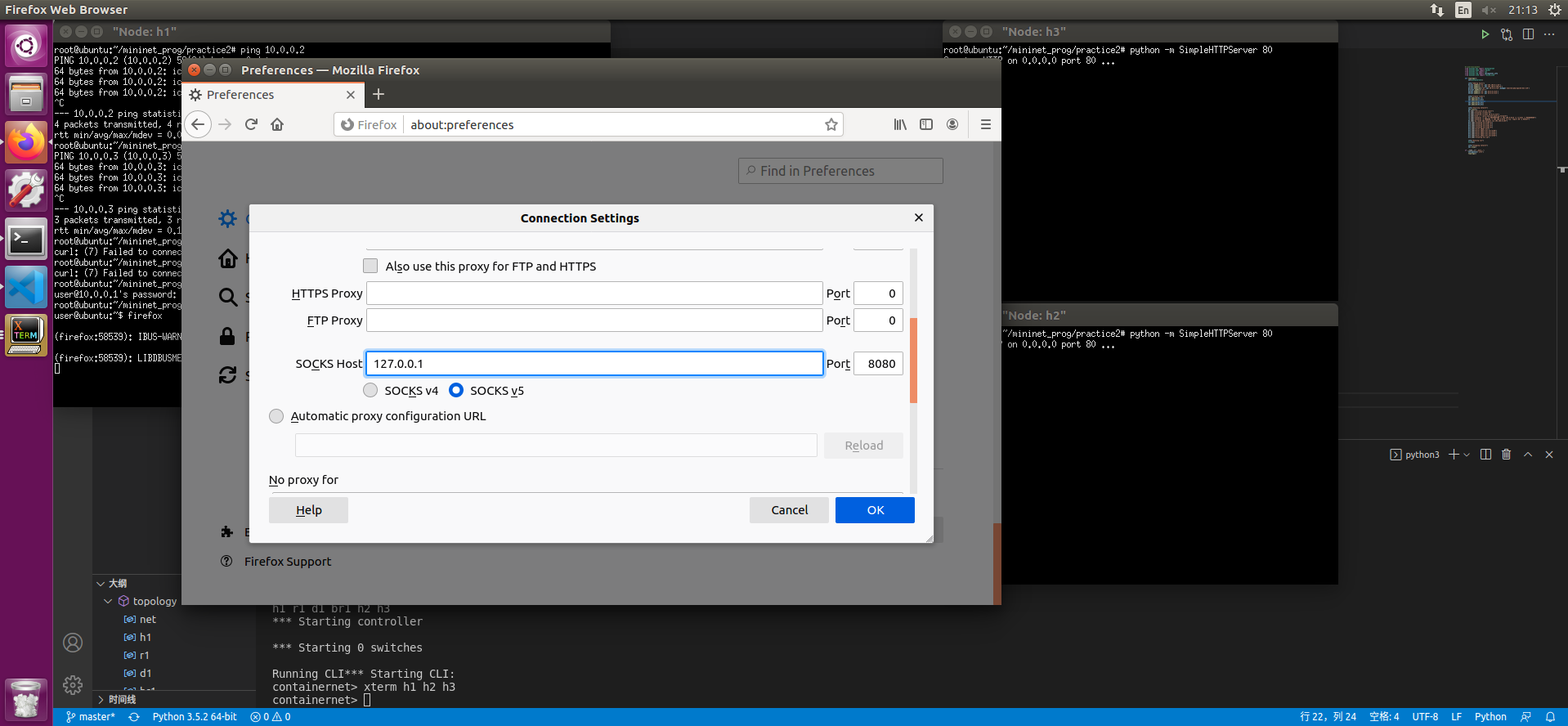
  • 可以访问10.0.0.3和10.0.0.4的hi.html了


12. OVS的操作

实验所用拓扑结构:
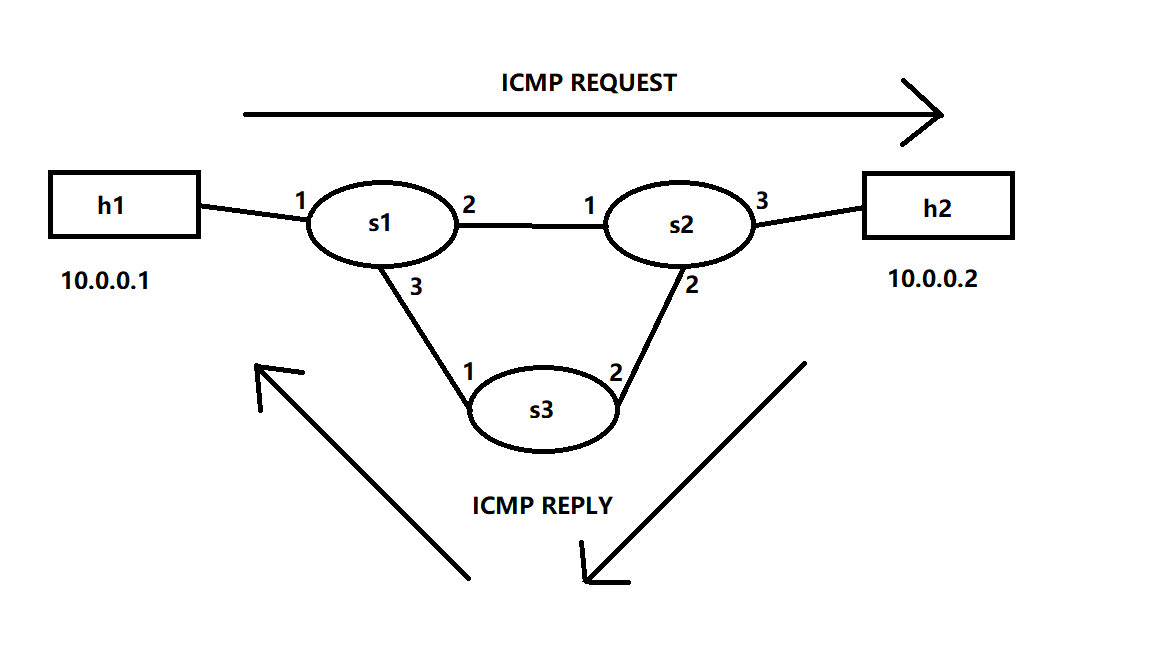
mininet脚本:

1
2
3
4
5
6
7
8
9
10
11
12
13
14
15
16
17
18
19
20
21
22
23
24
25
26
27
28
29
#!/usr/bin/env python
from mininet.cli import CLI
from mininet.link import TCLink,Link,Intf
from mininet.net import Mininet
from mininet.node import Controller,RemoteController

if "__main__" == __name__:
net=Mininet(link=TCLink)
h1=net.addHost("h1")
h2=net.addHost("h2")
s1=net.addSwitch('s1')
s2=net.addSwitch('s2')
s3=net.addSwitch('s3')
c0=net.addController('c0',controller=RemoteController)

net.addLink(h1,s1)
net.addLink(s1,s2)
net.addLink(s1,s3)
net.addLink(s3,s2)
net.addLink(s2,h2)

net.build()
c0.start()
s1.start([c0])
s2.start([c0])
s3.start([c0])

CLI(net)
net.stop()

然后我们通过命令行手动下发流表
1
2
3
4
5
6
7
8
9
10
11
12
13
14
15
16
# s1
ovs-ofctl add-flow s1 arp,arp_op=1,arp_spa=10.0.0.1,arp_tpa=10.0.0.2,actions=output:2
ovs-ofctl add-flow s1 arp,arp_op=1,arp_spa=10.0.0.2,arp_tpa=10.0.0.1,actions=output:1
ovs-ofctl add-flow s1 arp,arp_op=2,arp_spa=10.0.0.1,arp_tpa=10.0.0.2,actions=output:2
ovs-ofctl add-flow s1 arp,arp_op=2,arp_spa=10.0.0.2,arp_tpa=10.0.0.1,actions=output:1
ovs-ofctl add-flow s1 icmp,nw_src=10.0.0.1,nw_dst=10.0.0.2,icmp_type=8,icmp_code=0,actions=output:2
ovs-ofctl add-flow s1 icmp,nw_src=10.0.0.2,nw_dst=10.0.0.1,icmp_type=0,icmp_code=0,actions=output:1
# s2
ovs-ofctl add-flow s2 arp,arp_op=1,arp_spa=10.0.0.1,arp_tpa=10.0.0.2,actions=output:3
ovs-ofctl add-flow s2 arp,arp_op=1,arp_spa=10.0.0.2,arp_tpa=10.0.0.1,actions=output:1
ovs-ofctl add-flow s2 arp,arp_op=2,arp_spa=10.0.0.1,arp_tpa=10.0.0.2,actions=output:3
ovs-ofctl add-flow s2 arp,arp_op=2,arp_spa=10.0.0.2,arp_tpa=10.0.0.1,actions=output:1
ovs-ofctl add-flow s2 icmp,nw_src=10.0.0.1,nw_dst=10.0.0.2,icmp_type=8,icmp_code=0,actions=output:3
ovs-ofctl add-flow s2 icmp,nw_src=10.0.0.2,nw_dst=10.0.0.1,icmp_type=0,icmp_code=0,actions=output:2
# s3
ovs-ofctl add-flow s3 icmp,nw_src=10.0.0.2,nw_dst=10.0.0.1,icmp_type=0,icmp_code=0,actions=output:1

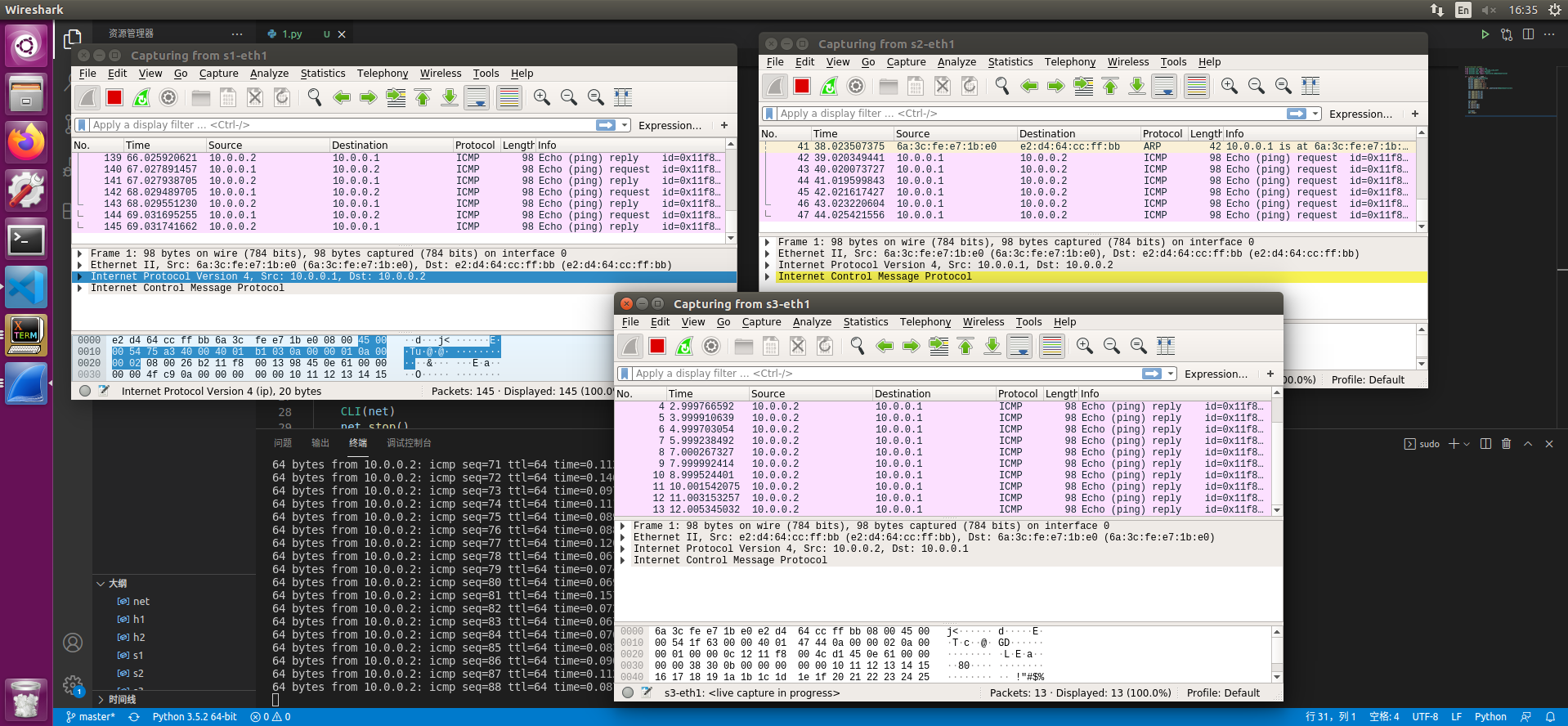
此时h1可以ping通h2
13. OVS交换机封包复制示例介绍

实验所用拓扑结构:
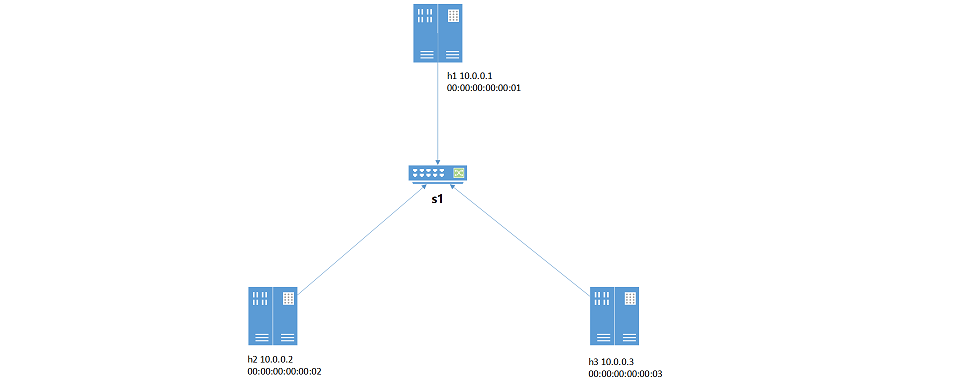
mininet脚本:

1
2
3
4
5
6
7
8
9
10
11
12
13
14
15
16
17
18
19
20
21
22
23
24
25
26
27
28
29
30
31
from mininet.cli import CLI
from mininet.net import Mininet
from mininet.link import Link,TCLink,Intf
from mininet.node import Controller,RemoteController

if '__main__'==__name__:
net=Mininet(link=TCLink)
h1=net.addHost('h1',ip='10.0.0.1/24',mac='00:00:00:00:00:01')
h2=net.addHost('h2',ip='10.0.0.2/24',mac='00:00:00:00:00:02')
h3=net.addHost('h3',ip='10.0.0.3/24',mac='00:00:00:00:00:03')
s1=net.addSwitch('s1')
c0=net.addController('c0',controller=RemoteController)

net.addLink(h1,s1)
net.addLink(h2,s1)
net.addLink(h3,s1)

net.build()

c0.start()
s1.start([c0])

h1.cmd("arp -s 10.0.0.2 00:00:00:00:00:02")
h1.cmd("arp -s 10.0.0.3 00:00:00:00:00:03")
h2.cmd("arp -s 10.0.0.1 00:00:00:00:00:01")
h2.cmd("arp -s 10.0.0.3 00:00:00:00:00:03")
h3.cmd("arp -s 10.0.0.1 00:00:00:00:00:01")
h3.cmd("arp -s 10.0.0.2 00:00:00:00:00:02")

CLI(net)
net.stop()

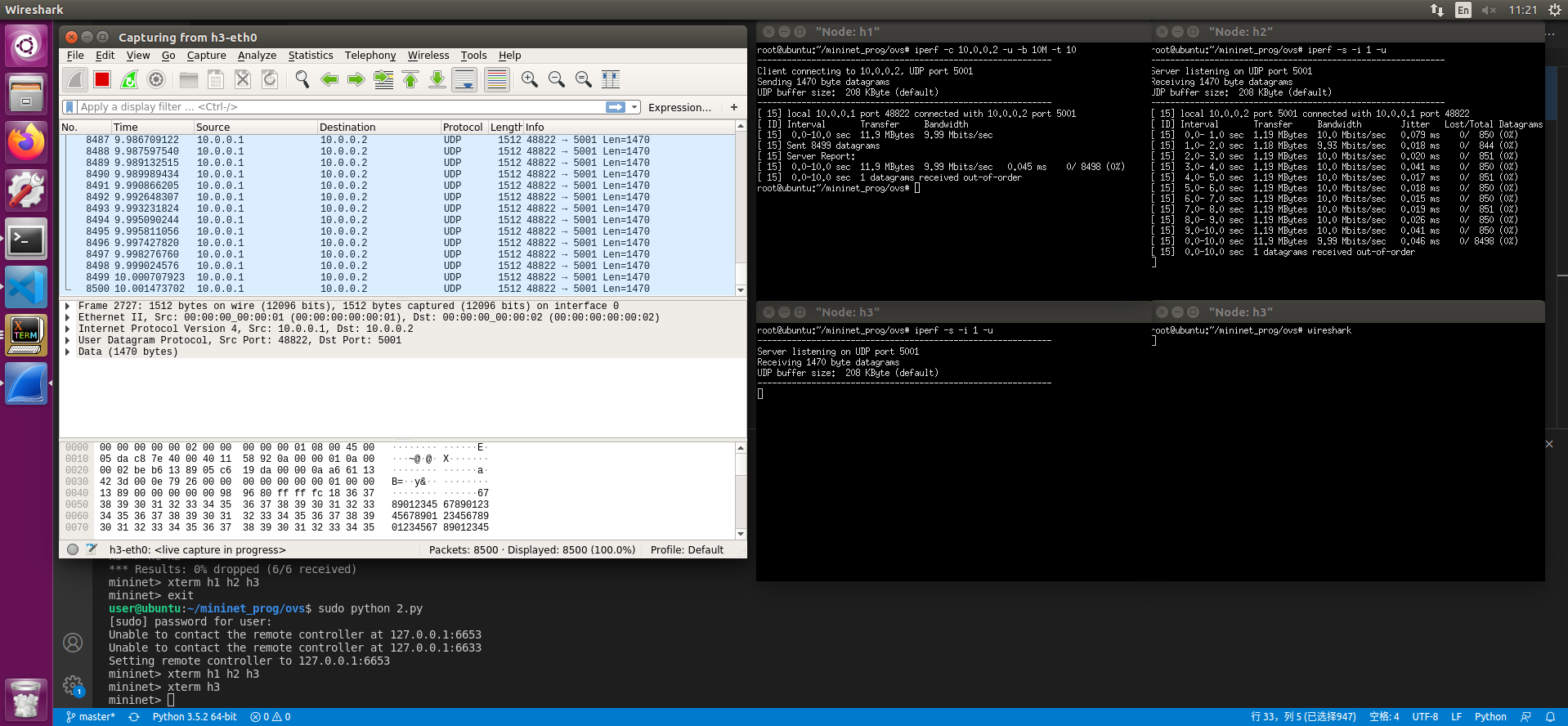
实验目标:通过h1发往h2的udp数据包复制一份给h3

1. 直接复制 不修改信息

下发如下流表

1
2
3
4
ovs-ofctl add-flow s1 priority=1,ip,nw_dst=10.0.0.1,actions=output:1
ovs-ofctl add-flow s1 priority=1,ip,nw_dst=10.0.0.2,actions=output:2
ovs-ofctl add-flow s1 priority=1,ip,nw_dst=10.0.0.3,actions=output:3
ovs-ofctl add-flow s1 priority=10,udp,nw_src=10.0.0.1,nw_dst=10.0.0.2,actions=output:2,output:3

此时 三台机器可以互相ping 且h1->h2的udp包会转发一份给h3
2. 复制并修改目的地址

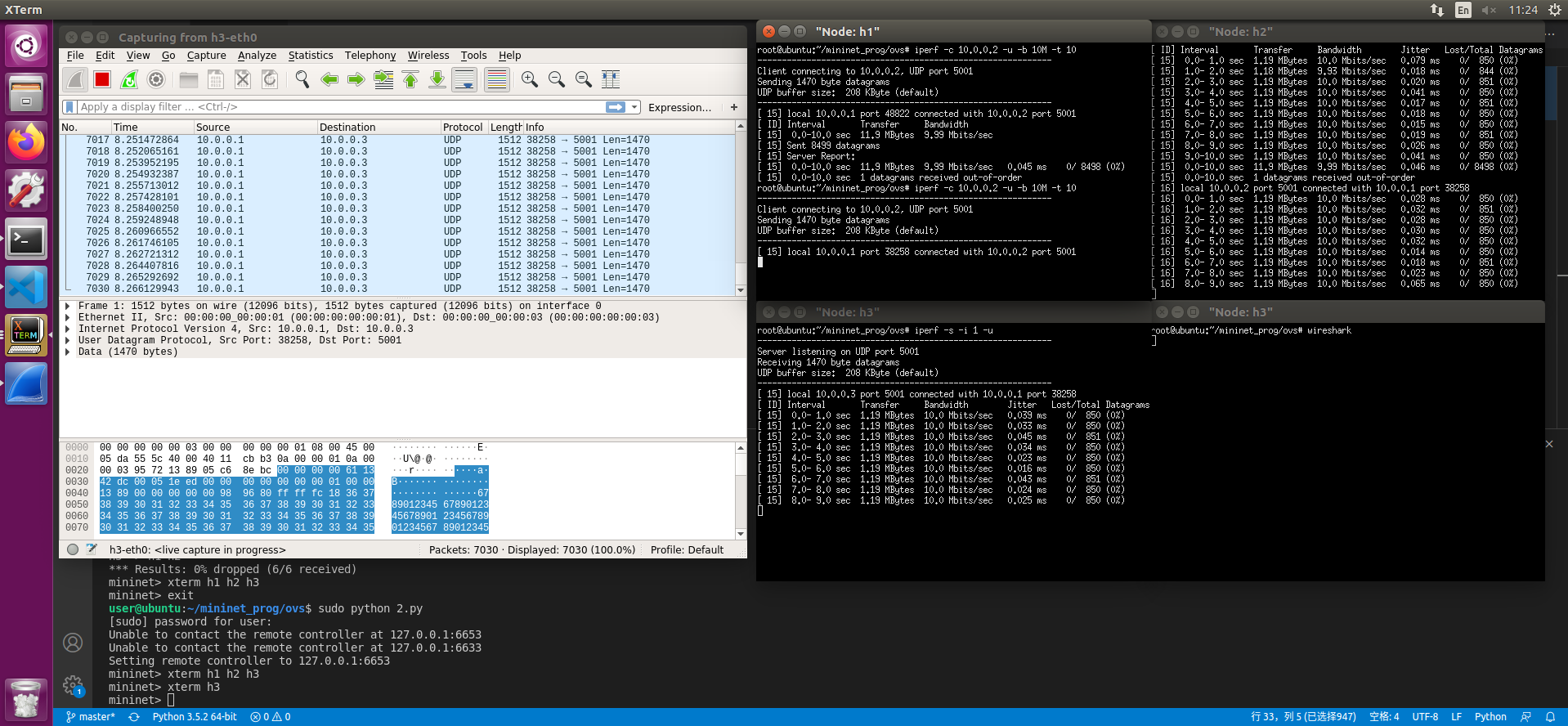
在1的基础上下发如下流表

1
ovs-ofctl add-flow s1 priority=100,udp,nw_src=10.0.0.1,nw_dst=10.0.0.2,actions=output:2,mod_dl_dst=00:00:00:00:00:03,mod_nw_dst=10.0.0.3,output:3

此时 h3会收到修改后的数据包
LeetCode-91.解码方法

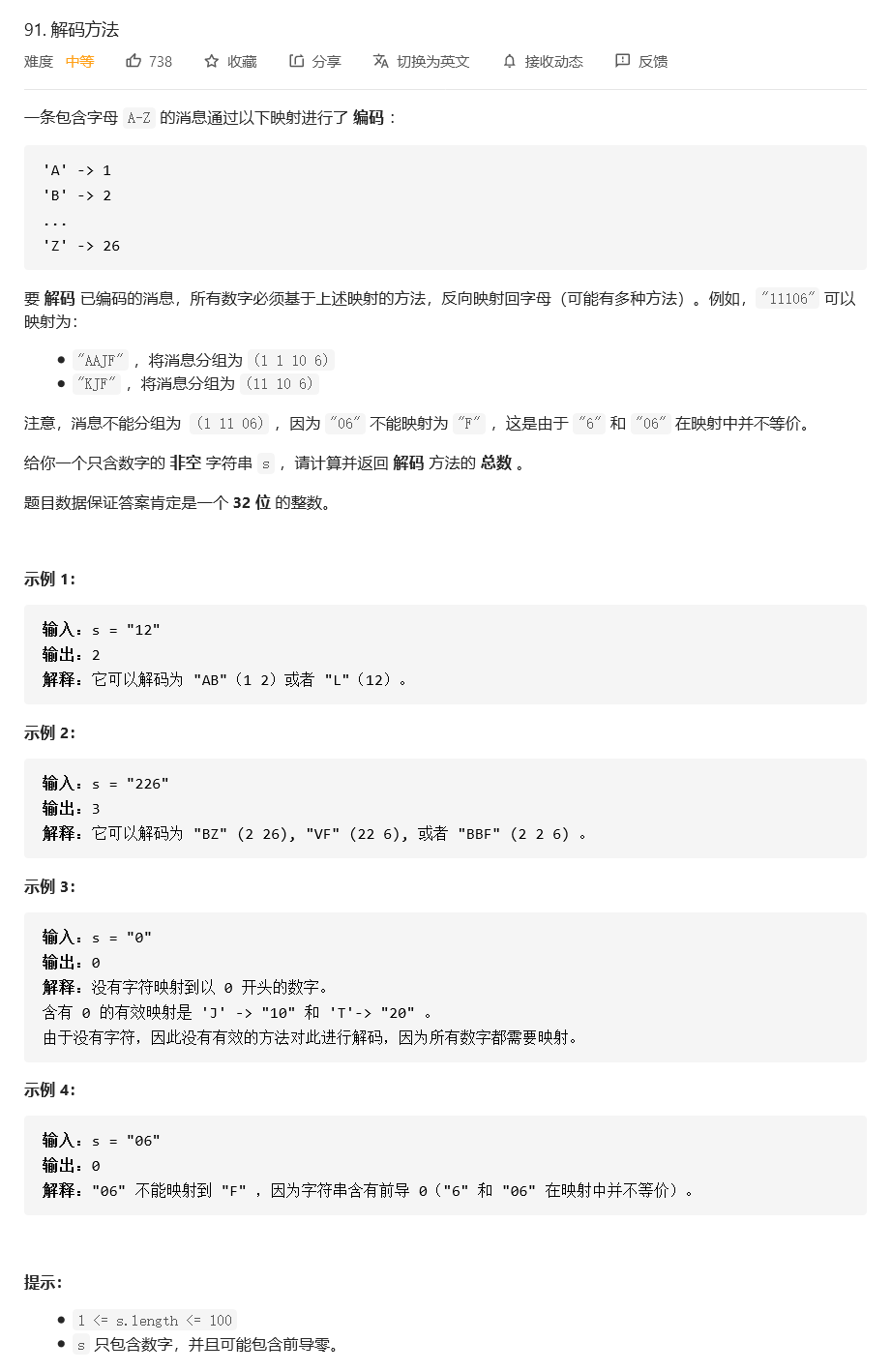
问题描述

思路及解决方法

动态规划
设 $f_i$ 是 $s[1:i]$ 对应字符串对应的解码方法次数(下标从1开始)
对于 $f_i$

  1. 只使用了一个字符 s[i] 解码 若$s[i] \neq 0$ 则$s[i]$一定与A~I中一个对应
    状态转移方程为:
  2. 使用了两个字符 s[i]s[i-1] 此时$s[i-1] \neq 0$ 且s[i]和s[i-1]组成的整数必须小于26
    状态转移方程为: 需要$i>1$才能转移

边界条件 $f_0=1$
空字符串可以有 1 种解码方法 解码出一个空字符串

注意到 $fi$ 只与 $f{i-1}$ 和 $f_{i-2}$ 有关 我们只用三个变量即可

注意:C++下标从零开始 注意减去一

1
2
3
4
5
6
7
8
9
10
11
12
13
14
15
16
17
18
19
20
21
22
23
24
25
class Solution {
public:
int numDecodings(string s) {
int n=s.size();
int prev1=1,prev2=0,now=0;
/*
prev1 -> f[i-1]
prev2 -> f[i-2]
now -> f[i]
*/
for(int i=1;i<=n;i++){
now=0;
if(s[i-1]!='0'){
now+=prev1;
}
if(i>1&&s[i-2]!='0'&&((s[i-2]-'0')*10+s[i-1]-'0')<=26){
now+=prev2;
}
prev2=prev1;
prev1=now;
}
return now;
}

};

LeetCode-169.多数元素

问题描述

思路与解决办法

1. 哈希表

统计每个元素出现的次数 最后取最大的那个即可
1
2
3
4
5
6
7
8
9
10
11
12
13
14
15
16
17
class Solution {
public:
int majorityElement(vector<int>& nums) {
unordered_map<int,int> hashmap;
for(auto i:nums){
++hashmap[i];
}
int max=0,max_i=0;
for(auto it=hashmap.begin();it!=hashmap.end();it++){
if(it->second>max){
max=it->second;
max_i=it->first;
}
}
return max_i;
}
};
* 时间复杂度:$O(n)$ * 空间复杂度:$O(n)$ {% asset_img 1.png resolution_1 %}

2. 排序

对元素先排序 则$\frac{n}{2}$处的元素一定是众数
1
2
3
4
5
6
7
class Solution {
public:
int majorityElement(vector<int>& nums) {
sort(nums.begin(),nums.end());
return nums.at(nums.size()/2);
}
};
* 时间复杂度:$O(n\log{n})$ * 空间复杂度:$O(n\log{n})$ {% asset_img 2.png resolution_2 %}

3. 随机化

随机挑选元素 判断是不是众数
1
2
3
4
5
6
7
8
9
10
11
12
13
14
15
16
17
18
class Solution {
public:
int majorityElement(vector<int>& nums) {
int n=nums.size();
int halfn=n/2;
while(1){
int cand=nums[rand()%n];
if(count(nums,cand)>halfn) return cand;
}
}
int count(vector<int> &nums,int num){
int c=0;
for(auto i:nums){
c+=i==num?1:0;
}
return c;
}
};
* 时间复杂度: 理论上最坏情况的时间复杂度是$O(\infty)$ 因为我们可能一直找不到众数 但是 期望为线性值 计算方法如下 $$ E\leq{E_{frac{n}{2}}} =\lim_{n \to \infty}{\sum_{i=1}^{n}{i*\frac{1}{2^i}}} =2 $$ 每次取随机数后 仍需要$O(n)$时间来判断是不是众数 所以期望的时间复杂度为$O(n)$ * 空间复杂度:$O(1)$ {% asset_img 3.png resolution_3 %}

4. 分治法

易得 若一个数是数组的众数 则他是左半边数组的众数或者是右半边数组的众数
可以使用反证法证明 假设一个数`a`他既不是是左半边数组的众数也不是是右半边数组的众数
根据题目定义 `count(a)`<$\frac{l}{2}+\frac{r}{2}$ 其中`l`和`r`分别是左右两边长度
则`count(a)`<$\frac{l+r}{2}$ 他也不是数组的众数 产生矛盾

我们递归求解 长度为 1 的子数组中唯一的数显然是众数 如果回溯后某区间的长度大于1 我们必须将左右子区间的值合并 如果它们的众数相同 那么显然这一段区间的众数是它们相同的值 
否则 我们需要比较两个众数在整个区间内出现的次数来决定该区间的众数

1
2
3
4
5
6
7
8
9
10
11
12
13
14
15
16
17
18
19
20
21
22
23
24
class Solution {
int count(vector<int> &nums,int target,int lo,int hi){
int c=0;
for(int i=lo;i<=hi;i++){
if(nums[i]==target) c++;
}
return c;
}
int work(vector<int> &nums,int lo,int hi){
if(lo==hi) return nums[lo];
int mid=lo+(hi-lo)/2;
int left=work(nums,lo,mid);
int right=work(nums,mid+1,hi);
if(count(nums,left,lo,hi)>(hi-lo+1)/2)
return left;
if(count(nums,right,lo,hi)>(hi-lo+1)/2)
return right;
return -1;
}
public:
int majorityElement(vector<int>& nums) {
return work(nums,0,nums.size()-1);
}
};
* 时间复杂度: 函数将求解2个长度为$\frac{n}{2}$的子问题 并作两遍扫描 即 $$ O(n)=2*T(\frac{n}{2})+2n $$ 根据[主定理](https://baike.baidu.com/item/%E4%B8%BB%E5%AE%9A%E7%90%86/3463232?fr=aladdin) $$ T(n)=\Theta(n\log_{b}{a}\log{n})=\Theta(n\log_{2}{2}\log{n})=\Theta(n\log{n}) $$ 即为$O(n\log{n})$ * 空间复杂度:$O(\log{n})$ 来自于递归的栈消耗 数组长度变为1前递归$\log{n}$次 {% asset_img 4.png resolution_4 %}

5. Boyer-Moore 投票算法

维护一个候选数字 `cand` 和他出现的次数 `count` `cand`初始化为任意值 `count`初始化为0
遍历数组 对于每个元素`x`
- 若`count==0` 则`cand=x`
- 继续判断`x`
    - 若`x==cand` 则`count+=1`
    - 否则 `count-=1`
遍历完成后 `cand` 的值就是众数

1
2
3
4
5
6
7
8
9
10
11
12
class Solution {
public:
int majorityElement(vector<int>& nums) {
int cand=0,count=0;
for(auto x:nums){
if(count==0) cand=x;
if(x==cand) count++;
else count--;
}
return cand;
}
};
* 时间复杂度: $O(n)$ * 空间复杂度: $O(1)$ {% asset_img 5.png resolution_5 %}

LeetCode.354.俄罗斯套娃信封问题

问题描述

解题思路及代码

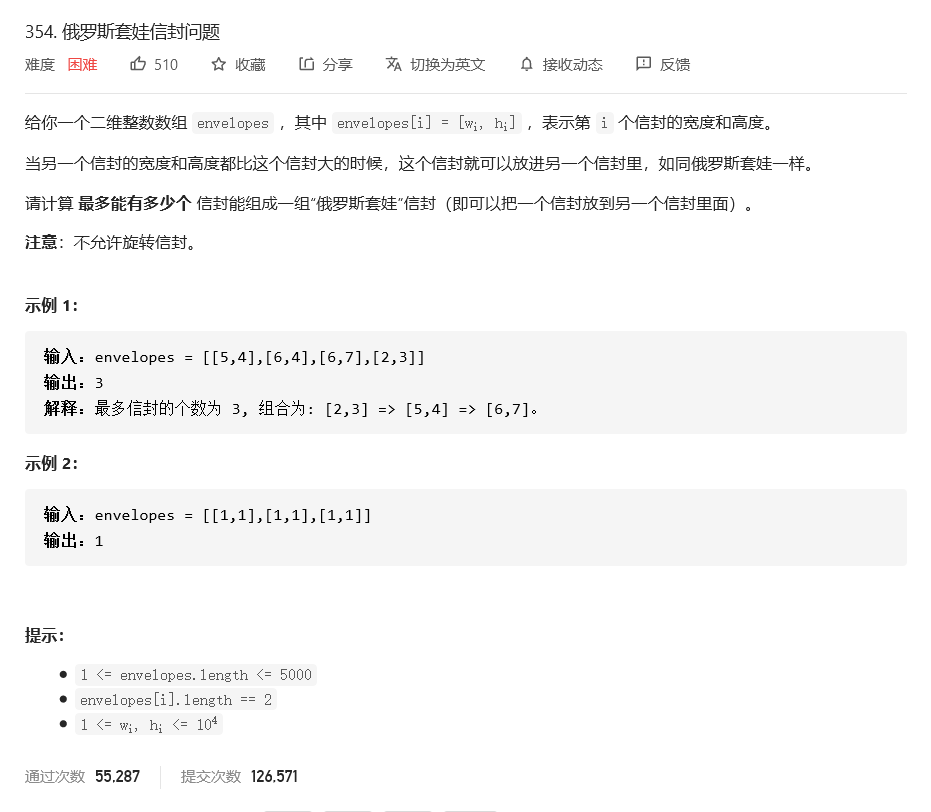
题目的本质是找出一个最长的二维数组序列 满足其在两个维度上都严格递增(不包含相等的情况)

思路一

两个维度都使用 排序法 使两个维度都递增 然后使用动态规划

1
2
3
4
5
6
7
8
9
10
11
12
13
14
15
16
17
18
class Solution {
public:
int maxEnvelopes(vector<vector<int>>& envelopes) {
int n=envelopes.size();
if(!n) return 0;
sort(envelopes.begin(),envelopes.end()); //两个维度升序排序
vector<int> dp(n,1); //动态规划记忆化数组
for(int i=0;i<n;i++){
for(int j=0;j<n;j++){
if(envelopes[i][0]>envelopes[j][0]&&
envelopes[i][1]>envelopes[j][1]){ //找到符合条件的信封
dp[i]=max(dp[i],dp[j]+1); //取较大值
}
}
}
return *max_element(dp.begin(),dp.end()); //直接返回最大值
}
};
  • 时间复杂度 $O(n^2)$
  • 空间复杂度 $O(n)$
  • 该解法在部分语言下会超时

思路二

第一个维度升序 第二个维度降序 最后动态规划

1
2
3
4
5
6
7
8
9
10
11
12
13
14
15
16
17
18
19
20
21
22
class Solution {
public:
int maxEnvelopes(vector<vector<int>>& envelopes) {
int n=envelopes.size();
if(!n) return 0;
sort(envelopes.begin(),envelopes.end(),[](auto &a1,auto &a2){
return a1[0]<a2[0]||(a1[0]==a2[0]&&a1[1]>a2[1]);
});
/*
使用C++的匿名函数[](){} 传递sort的第三个参数 该参数用于判断是否需要交换两个值
*/
vector<int> dp(n,1);
for(int i=0;i<n;i++){
for(int j=0;j<i;j++){
if(envelopes[j][1]<envelopes[i][1]){ //动态规划第二维度
dp[i]=max(dp[i],dp[j]+1);
}
}
}
return *max_element(dp.begin(),dp.end());
}
};
  • 时间复杂度 $O(n^2)$ 其中n是数组envelopes的长度 排序的时间复杂度为$O(n\log{n})$ 动态规划的时间复杂度为$O(n^2)$
  • 空间复杂度 $O(n)$

思路三

在思路二的基础上 排序后维护一个数组$f$ 对envelopes二分搜索
考虑当前元素$h_i$

  • 若$h_i$大于f中最大值 则$h_i$可以连接在之后成为一个更长的严格递增序列
  • 否则我们找出 $f$ 中比 $h_i$​ 严格小的最大的元素 $f[j_0]$ 即 $f[j_0]<h_i<=f[j_0+1]$ 那么 $h_i$​ 可以接在$f[j_0]$之后,形成一个长度为$j_0+1$的严格递增子序列,因此需要对$f[j_0+1]$进行更新

最后$f$的长度即所求

1
2
3
4
5
6
7
8
9
10
11
12
13
14
15
16
17
18
19
20
21
22
class Solution {
public:
int maxEnvelopes(vector<vector<int>>& envelopes) {
int n=envelopes.size();
sort(envelopes.begin(),envelopes.end(),[](auto a1,auto a2){
return a1[0]<a2[0]||(a1[0]==a2[0]&&a1[1]>a2[1]);
});
vector<int> f;
f.emplace_back(envelopes[0][1]);
for(int i=1;i<n;i++){
int num=envelopes[i][1];
if(num>f.back()){
f.emplace_back(num);
}
else{
auto it=lower_bound(f.begin(),f.end(),num);
*it=num;
}
}
return f.size();
}
};
  • 时间复杂度 $O(n\log{n})$ 其中n是数组envelopes的长度 排序的时间复杂度为$O(n\log{n})$ 动态规划的时间复杂度为$O(n\log{n})$
  • 空间复杂度 $O(n)$

LeetCode87.扰乱字符串

部分转载自以下链接:
LeetCode-Solution
jerry_nju

题目描述

使用下面描述的算法可以扰乱字符串 s 得到字符串 t :

  1. 如果字符串的长度为 1 ,算法停止
  2. 如果字符串的长度 > 1 ,执行下述步骤:
    1. 在一个随机下标处将字符串分割成两个非空的子字符串。即,如果已知字符串 s ,则可以将其分成两个子字符串 x 和 y ,且满足 s = x + y 。
    2. 随机 决定是要「交换两个子字符串」还是要「保持这两个子字符串的顺序不变」。即,在执行这一步骤之后,s 可能是 s = x + y 或者 s = y + x 。
    3. 在 x 和 y 这两个子字符串上继续从步骤 1 开始递归执行此算法.

给你两个 长度相等 的字符串 s1 和 s2,判断 s2 是否是 s1 的扰乱字符串。如果是,返回 true ;否则,返回 false .

示例

示例一

1
2
3
4
5
6
7
8
9
10
11
输入:s1 = "great", s2 = "rgeat"
输出:true
解释:s1 上可能发生的一种情形是:
"great" --> "gr/eat" // 在一个随机下标处分割得到两个子字符串
"gr/eat" --> "gr/eat" // 随机决定:「保持这两个子字符串的顺序不变」
"gr/eat" --> "g/r / e/at" // 在子字符串上递归执行此算法。两个子字符串分别在随机下标处进行一轮分割
"g/r / e/at" --> "r/g / e/at" // 随机决定:第一组「交换两个子字符串」,第二组「保持这两个子字符串的顺序不变」
"r/g / e/at" --> "r/g / e/ a/t" // 继续递归执行此算法,将 "at" 分割得到 "a/t"
"r/g / e/ a/t" --> "r/g / e/ a/t" // 随机决定:「保持这两个子字符串的顺序不变」
算法终止,结果字符串和 s2 相同,都是 "rgeat"
这是一种能够扰乱 s1 得到 s2 的情形,可以认为 s2s1 的扰乱字符串,返回 true

示例二
1
2
输入:s1 = "abcde", s2 = "caebd"
输出:false

示例三
1
2
输入:s1 = "a", s2 = "a"
输出:true

思路与方法

显然 若s和t长度不同 则必不能由s变化为t
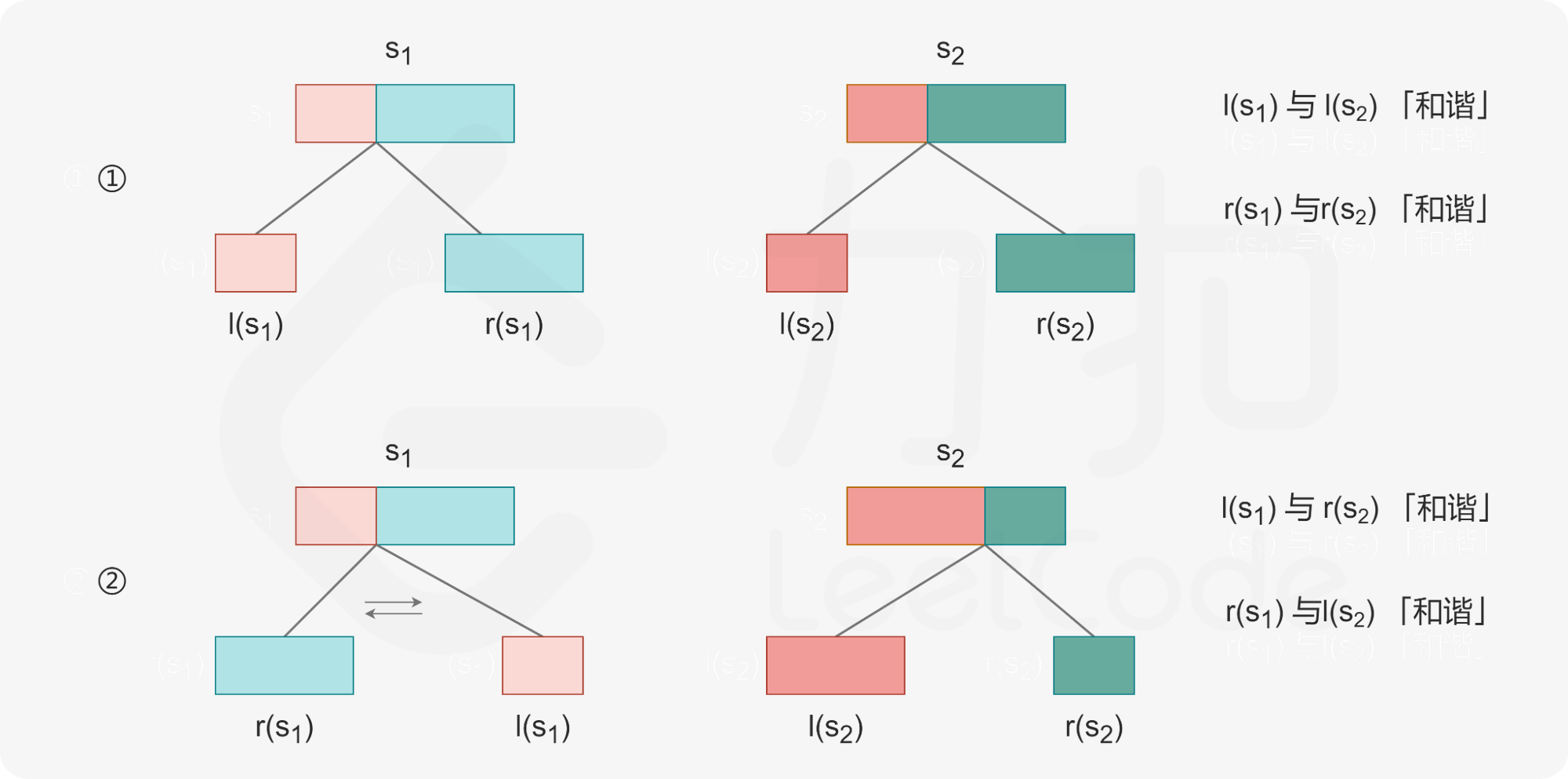
若长度相同 则存在一个分割点i1,使s分割为s1s2,一个分割点i2,使t分割为t1t2

满足

  • 没交换 s1->t1 s2->t2
  • 交换了 s2->t1 s1->t2

子问题

分别讨论两种情况

记忆化搜索数组
可先设记忆化搜索数组为mem[i][j][k][h]
又因为s和t长度的关系 j-i=h-k
则可将数组降低为三维 mem[i][j][l]
表示从字符串 si 开始长度为 l 的字符串是否能变换为从字符串 tj 开始长度为 l 的字符串

状态转移方程

初始条件
对于长度为1的串 只有相等才能变换得到 相等为 true 不相等为 false

代码

1
2
3
4
5
6
7
8
9
10
11
12
13
14
15
16
17
18
19
20
21
22
23
24
25
26
27
28
29
30
31
32
33
34
35
36
37
38
39
40
41
42
43
44
45
46
47
48
class Solution {
public:
int mem[30][30][31];
string s1,s2;
bool check(int i1,int i2,int l){
unordered_map<char,int> freq;
for(int i=i1;i<i1+l;i++){
freq[s1[i]]+=1;
}
for(int i=i2;i<i2+l;i++){
freq[s2[i]]-=1;
}
for(auto it=freq.begin();it!=freq.end();it++){
if(it->second!=0)return false;
}
return true;
}
bool dfs(int i1,int i2,int l){
if(mem[i1][i2][l])
return mem[i1][i2][l]==1;
if(s1.substr(i1,l)==s2.substr(i2,l)){
mem[i1][i2][l]=1;
return true;
}
if(!check(i1,i2,l)){
mem[i1][i2][l]=-1;
return false;
}
for(int i=1;i<l;i++){
if(dfs(i1,i2,i)&&dfs(i1+i,i2+i,l-i)){
mem[i1][i2][l]=1;
return true;
}
if(dfs(i1,i2+l-i,i)&&dfs(i1+i,i2,l-i)){
mem[i1][i2][l]=1;
return true;
}
}
mem[i1][i2][l]=-1;
return false;
}
bool isScramble(string s1, string s2) {
memset(mem,0,sizeof(mem));
this->s1=s1;
this->s2=s2;
return dfs(0,0,s1.size());
}
};

栈的最小值

题目描述

请设计一个栈,除了常规栈支持的pop与push函数以外,还支持min函数,该函数返回栈元素中的最小值。执行push、pop和min操作的时间复杂度必须为O(1)。

实例

1
2
3
4
5
6
7
8
MinStack minStack = new MinStack();
minStack.push(-2);
minStack.push(0);
minStack.push(-3);
minStack.getMin(); --> 返回 -3.
minStack.pop();
minStack.top(); --> 返回 0.
minStack.getMin(); --> 返回 -2.

解题方法

维护两个栈 一个存放数据 一个存放当前最小值

代码

1
2
3
4
5
6
7
8
9
10
11
12
13
14
15
16
17
18
19
20
21
22
23
24
25
26
27
28
29
30
31
32
33
34
35
36
37
38
39
40
41
class MinStack {
public:
/** initialize your data structure here. */
vector<int> min;
vector<int> vec;
MinStack() {

}

void push(int x) {
vec.push_back(x);
if(min.size()==0) min.push_back(x);
else {
int l=min.at(min.size()-1);
min.push_back(l>x?x:l);
}
}

void pop() {
vec.pop_back();
min.pop_back();
}

int top() {
int x=vec.at(vec.size()-1);
return x;
}

int getMin() {
return *(min.end()-1);
}
};

/**
* Your MinStack object will be instantiated and called as such:
* MinStack* obj = new MinStack();
* obj->push(x);
* obj->pop();
* int param_3 = obj->top();
* int param_4 = obj->getMin();
*/

层次分析法 AHP

针对问题类型

适用于解决评价类问题
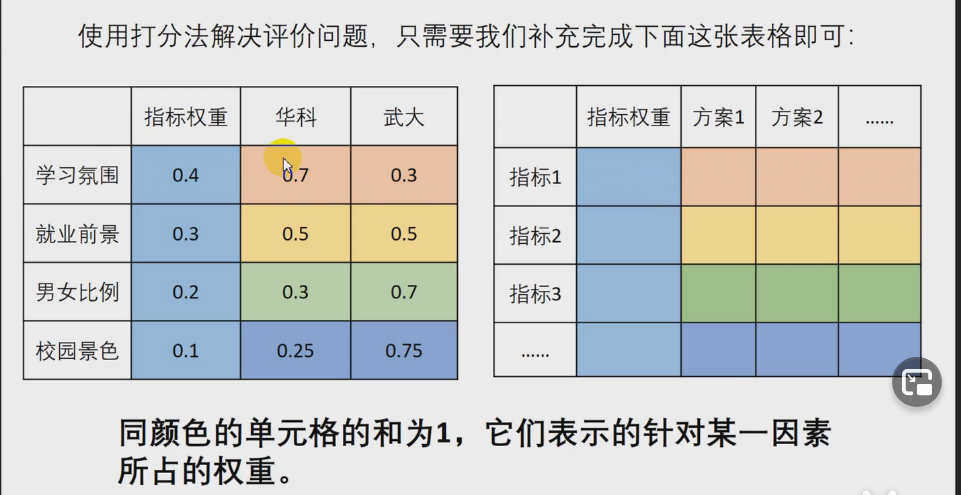
可以使用打分法解决评价类问题

如何解决评价类问题

明确三个问题

  1. 我们评价的目标
  2. 为了达到这个目标有几种方案
  3. 评价的准则、指标

搜索文献地址

知网
Google学术
百度学术

如何确定指标权重及各项的分数

分而治之:
一次性考虑这五个指标之间的关系,往往考虑不周
解决方法:
两个两个指标进行比较,最终根据两两比较的结果来推算出权重。

如何处理填写的数据

表可以转化成一个5x5的方阵 记该方阵为A 对应元素为$a_{ij}$

  1. 该矩阵就是层次分析法的判断矩阵

一致矩阵

判断矩阵可能存在Bug

若正互反矩阵满足

则该矩阵为一致矩阵

注意:在使用判断矩阵求权重之前,必须对其进行一致性检验

为一致矩阵的充要条件是


引理:A为n阶方阵,且r(A)=1,则A有一个特征值为tr(A),其余特征值均为0
因为一致矩阵的各行成比例,所以一致矩阵的秩一定为1
由引理可知:一致矩阵有一个特征值为m,其余特征值均为0
容易得到,特征值为n时,对应的特征向量刚好为


引理:m阶正互反矩阵A为一致矩阵时当且仅当最大特征值入m=n
且当正互反矩阵A非一致时,一定满足入m>n

一致性检验

  1. 计算一致性指标CI
  2. 查找对应的平均一致性指标RI
  3. 计算一致性比例CR

如果CR<0.1,则可认为判断矩阵的一致性可以接受;否则需要对判断矩阵进行修正

计算权重

一致矩阵

取出其中一列数据计算即可,则每一位的权重

非一致判断矩阵矩阵

1. 算术平均法求权重

  1. 将判断矩阵按列归一化,即每个元素除以其所在列的和
  2. 将归一化的各列相加(按行求和)
  3. 将相加后向量中每个元素除以n即可得到权重向量

    2. 几何平均法

  4. 将判断矩阵的元素按照行相乘得到一个新的列向量
  5. 将新的向量的每个分量开n次方
  6. 对该列向量进行归一化即可得到权重向量

    3.特征值法

  7. 求出矩阵A的最大特征值以及其对应的特征向量
  8. 对求出的特征向量进行归一化即可得到我们的权重

如何修正判断矩阵

如果$CR>0.1$,需要判断矩阵进行修正
向一致矩阵调整 使各列尽量成比例

计算各层元素对目标的权重

计算各层元素对目标的权重,并进行排序

局限性

  1. 评价的决策层不能太多,太多的话n会很大,判断矩阵和一致矩阵差异
  2. 如果决策层中指标的数据是已知的,那么我们如何利用这些数据来使评价的更加准确呢?

Unix-Linux编程实践1-who命令的实现

介绍

在使用Unix/Linux系统时,常常需要知道有哪些用户正在使用系统,系统是否繁忙,为了回答这些问题,所有的多用户系统都会有这个命令

关于who

我们将通过三个问题的解答来学习who命令

who能做什么

Unix/Linux who命令用于显示系统中有哪些使用者正在上面,显示的资料包含了使用者 ID、使用的终端机、从哪边连上来的、上线时间、呆滞时间、CPU 使用量、动作等等。

使用权限:所有使用者都可使用。

who是如何工作的

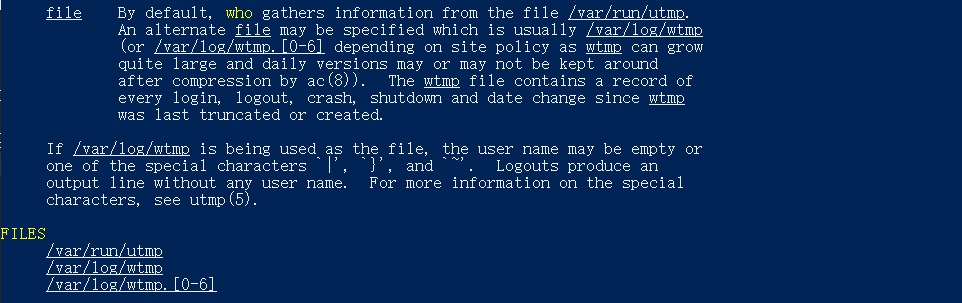
通过命令man who可以打开who的帮助文档

从上文易知 已登陆用户信息存储在/var/run/utmp中,who通过读取该文件来获得信息
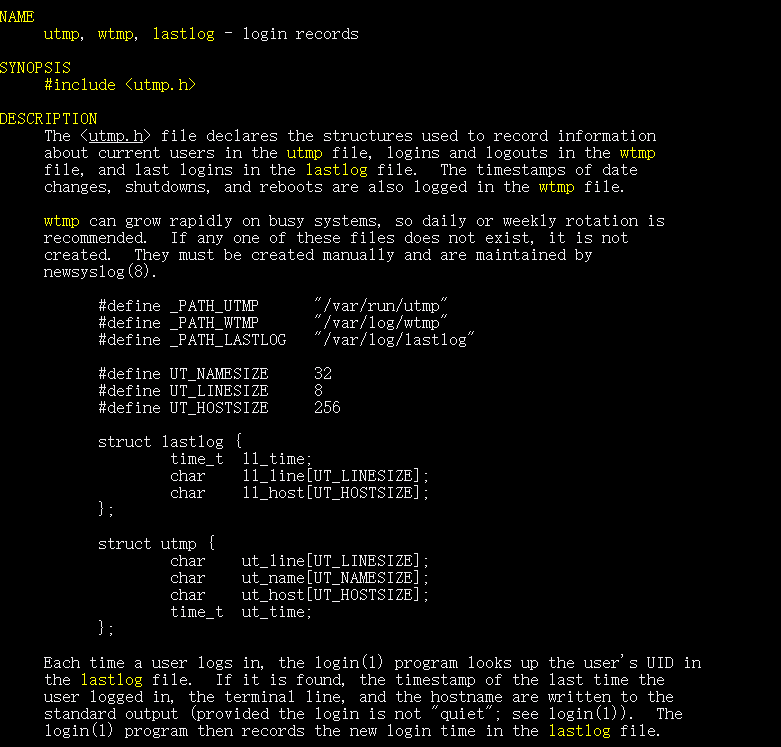
通过man utmp可以获得utmp文件记录的数据结构信息

所以who的工作原理可用以下流程完成

如何编写who

如何读取文件

通过搜索和read和file有关的文档

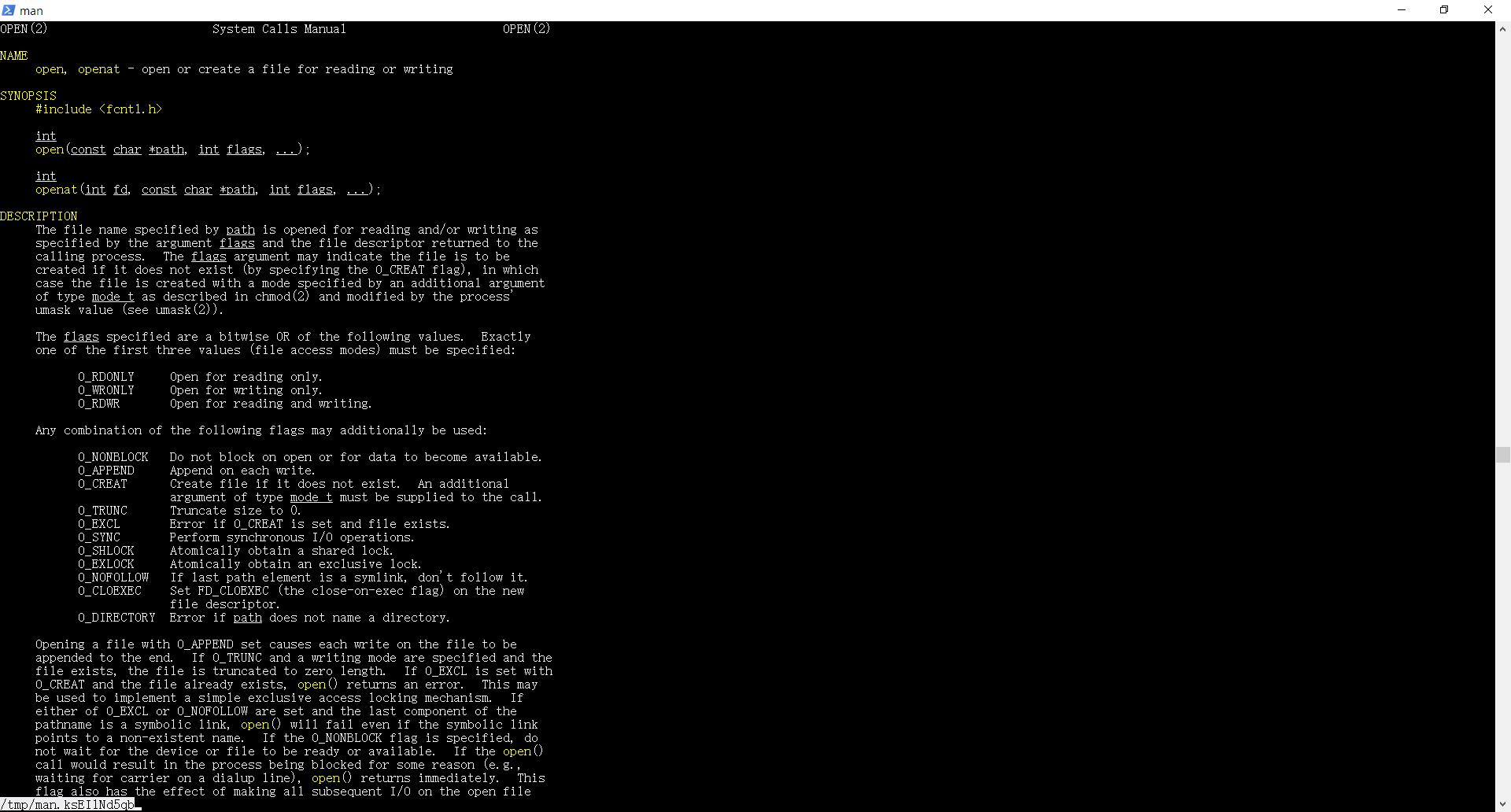
可以找到open(2)

通过open的文档可以找到其他的函数,分别是read close
open在打开文件时需要提供打开方式

open
target 打开文件
header #include <fcntl.h>
definition int fd = open(const char *name,int flags)
arguments name:文件名,flags:读取模式
ret -1 error,int success

其中 flags可以为O_RDONLY O_WRONLY O_RDWR

read
target 读取文件
header #include <unistd.h>
definition ssize_t numread = read(int fd,void *buf,size_t qty)
arguments fd:文件描述符,buf:缓冲区,qty:读取数量
ret -1 error,numread success
close
target 关闭文件
header #include <unistd.h>
definition int result = close(int fd)
arguments fd:文件描述符
ret -1 error,0 success

编写who1.c

1
2
3
4
5
6
7
8
9
10
11
12
13
14
15
16
17
18
19
20
21
22
23
24
25
26
27
28
29
30
31
32
33
34
35
36
37
38
39
40
41
42
/* 
* who version1
* show who login this machine
*/
#include <stdio.h>
#include <stdlib.h>
#include <utmp.h>
#include <fcntl.h>
#include <unistd.h>

#define SHOW_HOSTS

void show_info(struct utmp *utmpbuf);
int main(int argc,char *argv[]){
struct utmp rec;
int utmpfd;
int reclen=sizeof(rec);
utmpfd=open(_PATH_UTMP,O_RDONLY);
if(utmpfd==-1){
perror(_PATH_UTMP);
exit(1);
}
while(read(utmpfd,&rec,reclen) == reclen){
show_info(&rec);
}
close(utmpfd);
return 0;
}

void show_info(struct utmp *utmpbuf){
printf("%-8.8s",utmpbuf->ut_name);
printf(" ");
printf("%-8.8s",utmpbuf->ut_line);
printf(" ");
printf("%10ld",(long)utmpbuf->ut_time);
printf(" ");
#ifdef SHOW_HOSTS
printf("(%s)",utmpbuf->ut_host);
#endif
printf("\n");
}

编译who1
cc who1.c -o who1
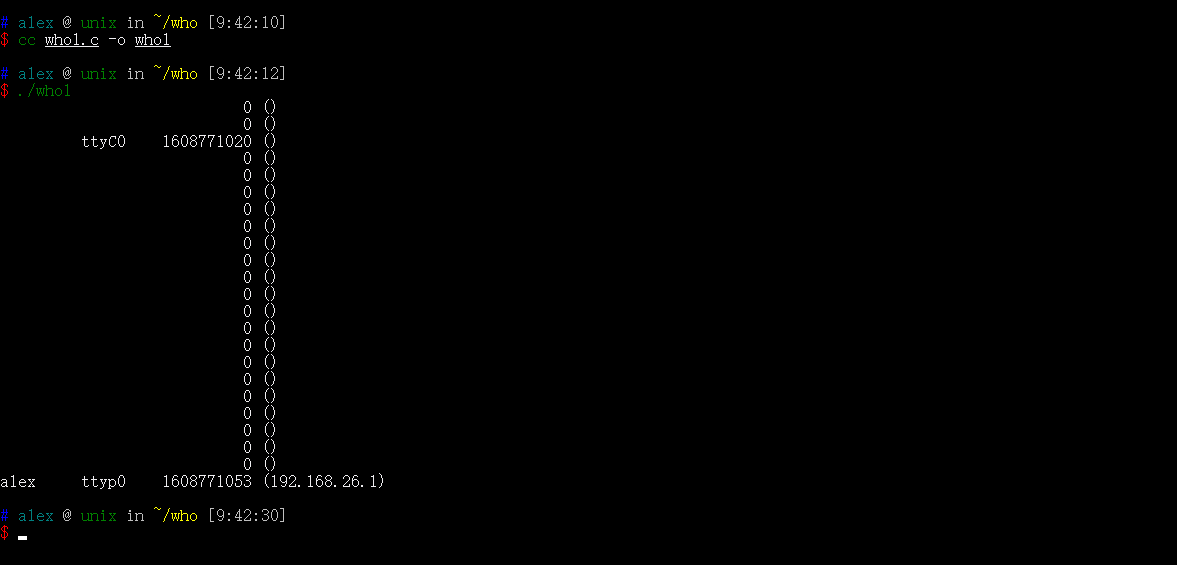
执行
./who1

可见 who1已经可以工作了,但是仍有很多可以完善

  • 消除空白记录
  • 正确显示时间

编写who2.c

1
2
3
4
5
6
7
8
9
10
11
12
13
14
15
16
17
18
19
20
21
22
23
24
25
26
27
28
29
30
31
32
33
34
35
36
37
38
39
40
41
42
43
44
45
46
47
48
49
50
51
52
53
54
55
56
57
58
59
60
61
62
63
/* 
* who version2
* show who login this machine
* change time format
* delete useless one
*
* open utmp file
* +--->read record-----<is eof>-----+
* | print record--<is empty>--+ |
* | | |
* +------------------------------+ |
* |
* close utmp file<-------------+
*
*/
#include <stdio.h>
#include <stdlib.h>
#include <utmp.h>
#include <fcntl.h>
#include <unistd.h>
#include <time.h>
#include <sys/types.h>
#include <string.h>

#define SHOW_HOSTS

void show_info(struct utmp *utmpbuf);
void show_time(time_t time);
int main(int argc,char *argv[]){
struct utmp rec;
int utmpfd;
int reclen=sizeof(rec);
utmpfd=open(_PATH_UTMP,O_RDONLY);
if(utmpfd==-1){
perror(_PATH_UTMP);
exit(1);
}
while(read(utmpfd,&rec,reclen) == reclen){
show_info(&rec);
}
close(utmpfd);
return 0;
}

void show_info(struct utmp *utmpbuf){
if(strlen(utmpbuf->ut_name)==0) return;
printf("%-8.8s",utmpbuf->ut_name);
printf(" ");
printf("%-8.8s",utmpbuf->ut_line);
printf(" ");
//printf("%10ld",(long)utmpbuf->ut_time);
show_time(utmpbuf->ut_time);
printf(" ");
#ifdef SHOW_HOSTS
printf("(%s)",utmpbuf->ut_host);
#endif
printf("\n");
}

void show_time(time_t time){
char *str=ctime(&time);
printf("%12.12s",str+4);
}

编译并运行
cc who2.c -o who2&&./who2

此时who已经可以按要求正常运行了

who1.c who2.c

二分查找-2

思路二 在循环体中排除

代码模板

1
2
3
4
5
6
7
8
9
10
int bs(vector<T> nums,T target){
int l=0,r=nums.size()-1,mid;
while(l<r){
mid=l+(r-l)/2;
if(nums[mid]<target)
l=mid+1;
else r=mid;
}
return l;
}

细节分析

  • 循环退出条件l<r
  • 边界写法
    • r = midl = mid + 1int mid = l + (r - l) / 2; 一定是配对出现的;
    • r = mid - 1l = midint mid = l + (r - l + 1) / 2; 一定是配对出现的。

适用范围

这种二分查找的思路,对于查找边界问题,会使得思考的过程变得简单。

练习

  1. 搜索插入位置

    题目描述

    解题思路

    首先 题目未说明数组是否为空 先判断是否为空
    如果最后一个元素小于目标值 则应返回最后一个元素的下标加一 也即数组长度
    其他情况可利用如上方法二分查找即可

    代码

    1
    2
    3
    4
    5
    6
    7
    8
    9
    10
    11
    12
    13
    14
    15
    16
    17
    18
    class Solution {
    public:
    int searchInsert(vector<int>& nums, int target) {
    if(nums.size()==0) return 0;
    if(nums[nums.size()-1]<target) return nums.size();
    int l=0,r=nums.size()-1,mid;
    while(l<r){
    mid=l+(r-l)/2;
    if(nums[mid]<target){
    l=mid+1;
    }
    else{
    r=mid;
    }
    }
    return l;
    }
    };
    35.搜索插入位置

2.

LeetCode 794 有效的井字游戏

题目描述

用字符串数组作为井字游戏的游戏板 board。当且仅当在井字游戏过程中,玩家有可能将字符放置成游戏板所显示的状态时,才返回 true。

游戏该板是一个 3 x 3 数组,由字符 “ “,”X” 和 “O” 组成。字符 “ “ 代表一个空位。

以下是井字游戏的规则:

  • 玩家轮流将字符放入空位(” “)中。
  • 第一个玩家总是放字符 “X”,且第二个玩家总是放字符 “O”。
  • “X” 和 “O” 只允许放置在空位中,不允许对已放有字符的位置进行填充。
  • 当有 3 个相同(且非空)的字符填充任何行、列或对角线时,游戏结束。
  • 当所有位置非空时,也算为游戏结束。
  • 如果游戏结束,玩家不允许再放置字符。
1
2
3
4
5
6
7
8
9
10
11
12
13
14
15
16
17
示例 1:
输入: board = ["O ", " ", " "]
输出: false
解释: 第一个玩家总是放置“X”。

示例 2:
输入: board = ["XOX", " X ", " "]
输出: false
解释: 玩家应该是轮流放置的。

示例 3:
输入: board = ["XXX", " ", "OOO"]
输出: false

示例 4:
输入: board = ["XOX", "O O", "XOX"]
输出: true

说明:

  • 游戏板 board 是长度为 3 的字符串数组,其中每个字符串 board[i] 的长度为 3。
  • board[i][j] 是集合 {" ", "X", "O"} 中的一个字符。

解题思路

首先 由于放置X先于OX的数量大于等于O的数量,且之多比O多一个

如满足以上条件,分析可能的局面如下四种

  • 游戏结束后没有赢家
  • X者获胜 此时X数量比O多一个
  • X者获胜 此时X数量与O相等
  • 两个人都赢 此情况违背了规则

所以可使用一个函数判断属于哪种局面,并得到结果

代码

1
2
3
4
5
6
7
8
9
10
11
12
13
14
15
16
17
18
19
20
21
22
23
24
25
26
27
28
29
30
31
32
33
34
35
36
37
38
39
40
41
42
43
44
45
46
47
class Solution {
public:
bool validTicTacToe(vector<string>& board) {
int x=0,o=0;
for(auto i:board){
for(auto j:i){
if(j=='X') x++;
else if(j=='O') o++;
}
}
if(x-o>1||x-o<0) return false;
int res=winer(board);
switch (res)
{
case 0:
return true;
case 1:
return (x-o)==1;
case 2:
return x==o;
case 3:
return false;
}
return false;
}
int winer(vector<string>& board){
bool xW=false,oW=false;
for(auto i : board){
if(i=="XXX"||i=="OOO"){
i[0]=='X'?xW=true:oW=true;
}
}
for(int i=0;i<3;i++){
if(board[0][i]==board[1][i]&&board[1][i]==board[2][i]&&board[0][i]!=' ')
board[0][i]=='X'?xW=true:oW=true;
}
if(board[0][0]==board[1][1]&&board[0][0]==board[2][2]&&board[0][0]!=' '){
board[0][0]=='X'?xW=true:oW=true;
}
if(board[0][2]==board[1][1]&&board[1][1]==board[2][0]&&board[1][1]!=' '){
board[1][1]=='X'?xW=true:oW=true;
}
if(oW&&xW) return 3;
if(!(oW||xW)) return 0;
return xW?1:2;
}
};
794.有效的井字游戏.cpp